17
Parts
Setup M.L. How to
M.L. Software Download Troubleshooting
Hardware Cong
Tech Stats/Info
Parts
Setup M.L. How to
M.L. Software Download Troubleshooting
Hardware Cong
Tech Stats/Info
Parts
Setup M.L. How to
M.L. Software Download Troubleshooting
Hardware Cong
Tech Stats/Info
Parts
Setup M.L. How to
M.L. Software Download Troubleshooting
Hardware Cong
Tech Stats/Info
Parts
Setup M.L. How to
M.L. Software Download Troubleshooting
Hardware Cong
Tech Stats/Info
Parts
Setup M.L. How to
M.L. Software Download Troubleshooting
Hardware Cong
Tech Stats/Info
Parts
Setup M.L. How to
M.L. Software Download Troubleshooting
Hardware Cong
Tech Stats/Info
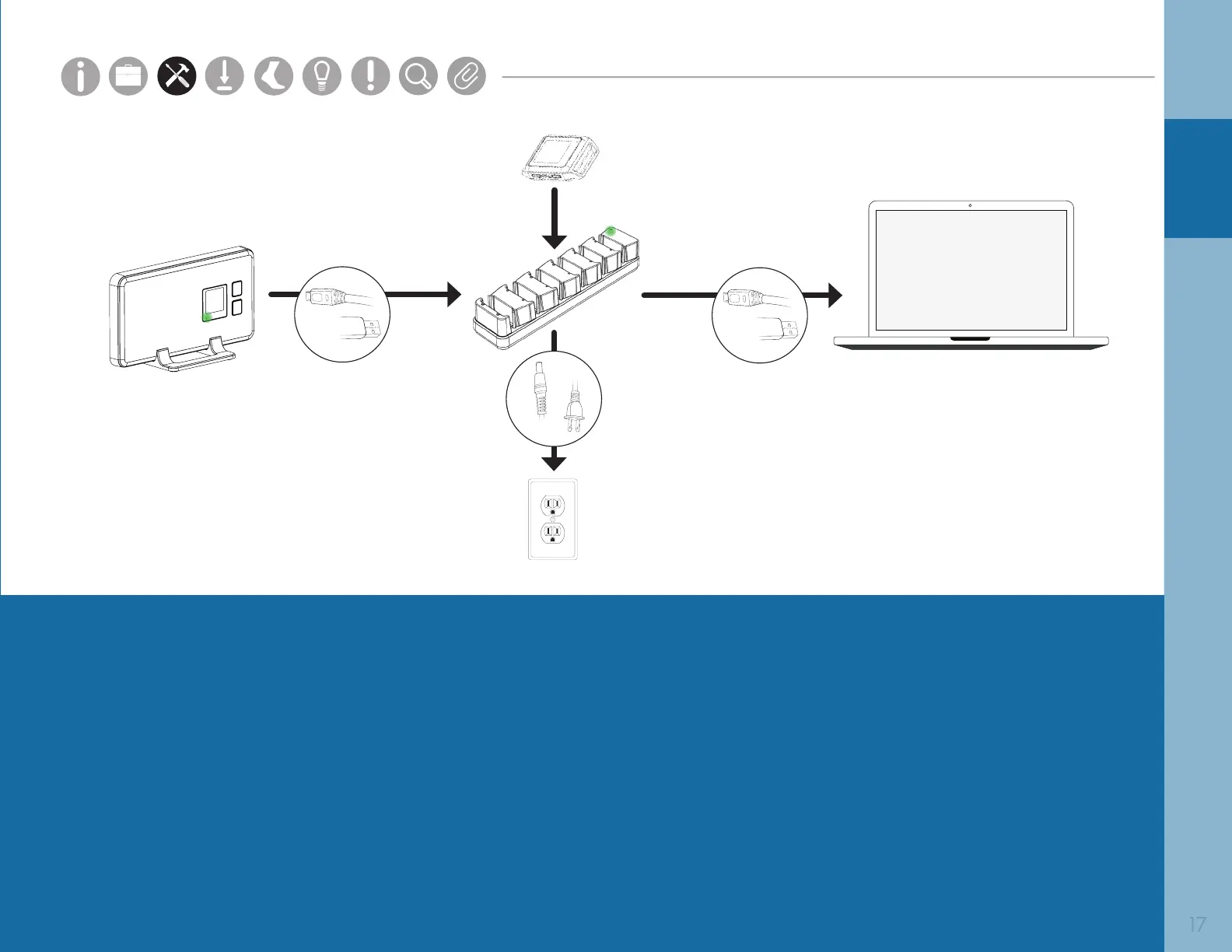
Access Point
Opal
Docking Station
SETUP
1. Connect the Access Point to the Docking Station using a Micro USB cable.
2. Connect the external power adapter to the Docking Station, and plug it in to a power outlet.
3. Connect the Docking Station to your computer using a Micro USB cable.
4. Plug the Opals into the Docking Station in any order.
It is the responsibility of the user to use the accessories supplied with the equipment.
Changes or modications not expressly approved by APDM could void user’s warranty.


 To Next Page
 Loading...