Note : The earbud will reconnect to the paired device
by priority. If you want to pair to the second smartphone.
Please disconnect wireless on the paired smartphone.
Mod
e
1
Mode 2
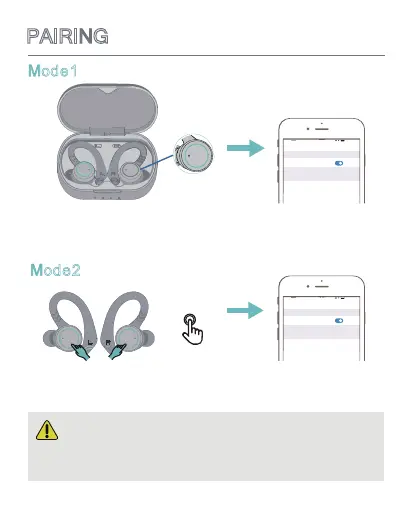
1.Open the charging case, they will automatically enter the
pairing mode in which the LED light flashes blue, and then
select " ”.
If the earbuds are not in the charging case. Click and hold
the MFB button for 6 seconds, they will automatically enter
the pairing mode and then select " " on your phone.
6
PAIRING
Voice Prompt: pairing
x 6s
BE1033
Bluetooth
Bluetooth
12:00
Settings
MY DEVICES
Connected
BE1033
Bluetooth
Bluetooth
12:00
Settings
MY DEVICES
Connected
BE1033
BE1033


 To Next Page