A P E X D I G I T A L
H T - 1 8 0
8
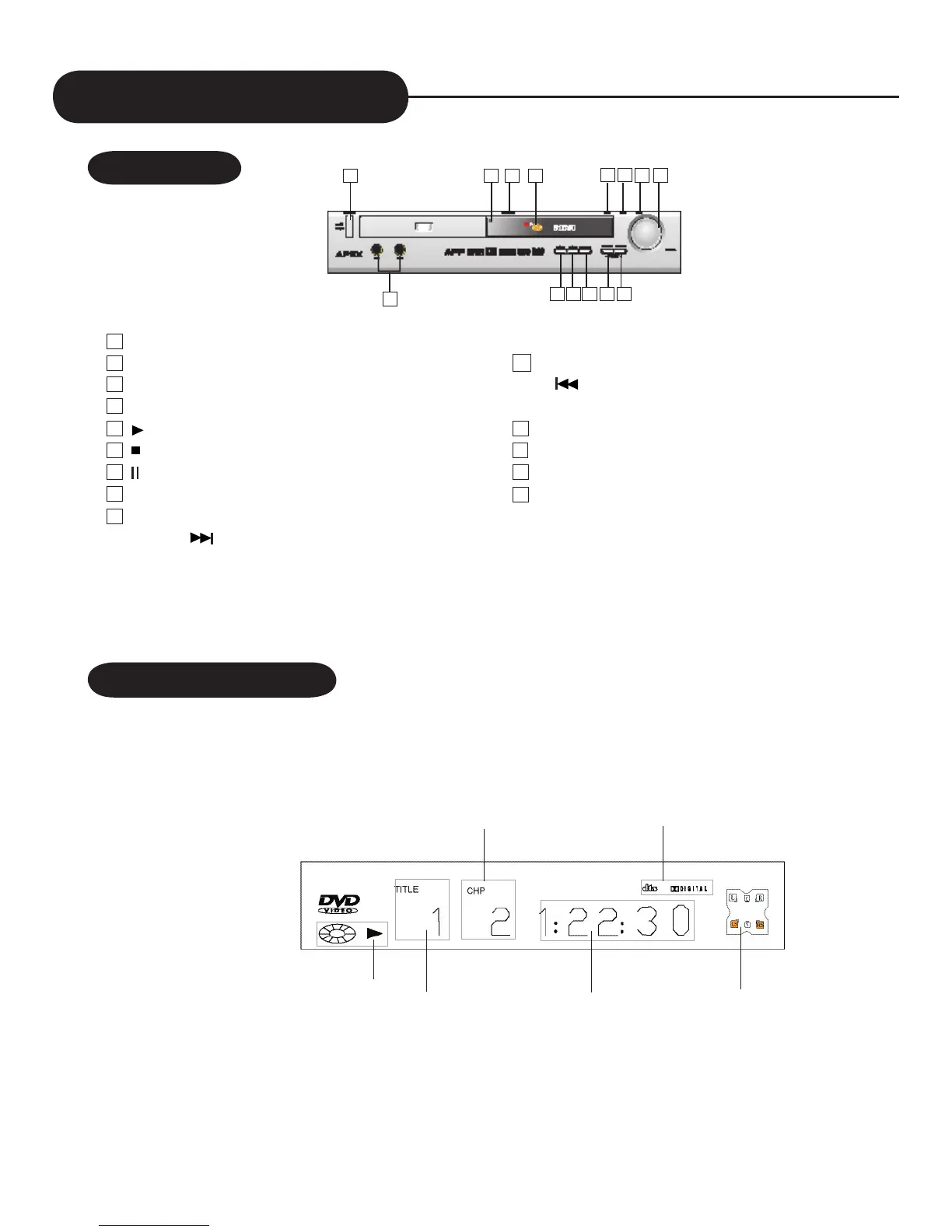
Idex of Parts and Controls
FRONT PANEL
1 POWER ON/OFF
2 INFRARED SENSOR
3 OPEN/CLOSE
4 STANDBY/ON INDICATOR
5 PLAY
6 STOP
7 PAUSE
8 VOLUME KNOB
9 MULTI-PURPOSE BUTTON
a) NEXT : page down or skip to next track
b) PRESET +: scan forward all the stations preset
10 MULTI-PURPOSE BUTTON
a) PREV: page up or skip to previous track
b) PRESET -: scan reverse all the stations preset
11 FUNCTION: switches among DVD, Tuner and Analog in
12 FM/AM: switch in FM and AM
13 MODE
14 MIC JACKS
1
12
11
10
9
14
13
2 3 4
5 6
7 8
When playing back a DVD
FRONT PANEL DISPLAY
Speaker indicator
Playing time
Current title number
Playing status
Current surround format
Current chapter number


 To Next Page