Page 5
Owner’s Manual
Why You Shouldn’t Connect the Channel’s Output to a Mic Level Input.
The bottom line: you will get an unsatisfactory noise level. The Channel is designed to generate a line level
output from a mic level input. It optimizes the signal to noise ratio by giving you a strong signal far above the
preamplifier’s basic self noise level. This strong output signal can be up to 65dB higher than the mic signal.
It is perfect for a standard line input of a mixer or console but can overload a mic input. If you have no other
choice but to plug the Channel in to a mic input, turn that mic input’s gain all the way down. If the signal still
clips the input, try bringing down the Channel output level.
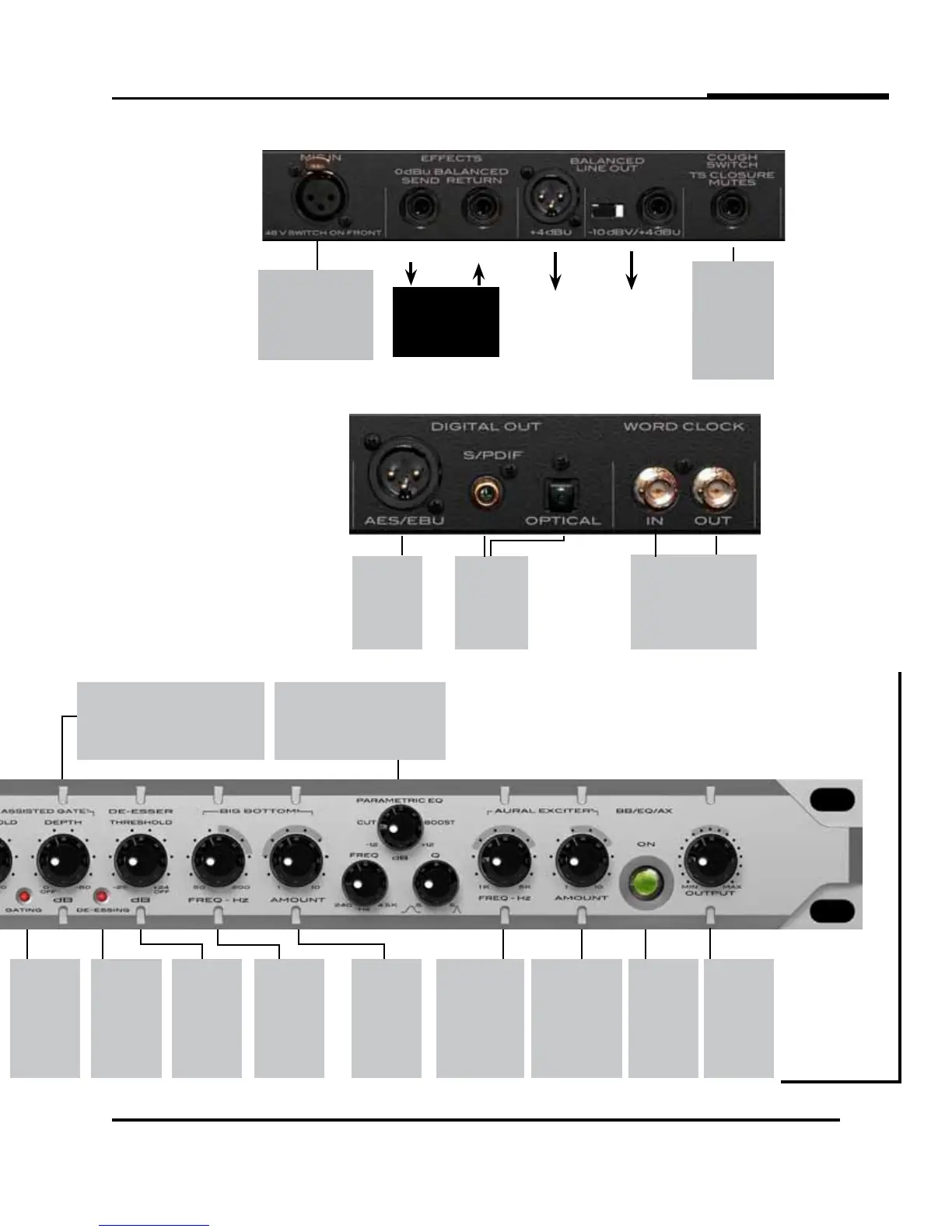
GATING
Shows when
the gate is
closed or clos-
ing. When the
light is off, the
gate is fully
open.
DEPTH
Lets you set how much attenuation the gate
will deliver. Use the lowest attenuation that’s
needed to reduce room wetness, breath,
or background noise. Usually 6 to 15dB is
sufficient. Fully CCW is off.
BIG-BOTTOM
FREQ
Adjusts the
frequency
below which
enhancement
takes place.
PARAMETRIC EQ
Works like a standard parametric band
with tune, Q, and boost/cut controls.
AURAL EXCITER
FREQ
Adjusts frequency
above which
enhancement
takes place.
AURAL EXCITER
AMOUNT
Adjusts the strength
(boost) of the Aural
Exciter effect.
BB/EQ/AX
ON
Switches
the BB/EQ/
AX on/off.
Provides full
true bypass
of the circuits
when off.
OUTPUT
Adjusts the
final pro-
cessed output
level as seen
on the VU
meter.
Line Level
Processor,
i.e.,
Compressor, EQ
+4dBu
Balanced
XLR Output
Rear Panel Analog Connections
BALANCED
TRS
Rear Panel Digital Connections
AES/EBU
OUTPUT
Digital 110
Ohm cables
only. (Do not
use regular
audio cables.)
S/PDIF &
OPTICAL
OUTPUTS
All outputs are
active at the
same time.
WORD CLOCK
BNC input and output jacks.
DIGITAL AUDIO
The Channel supplies industry
standard stereo AES/EBU, S/
PDIF, and TOSLINK digital audio
outputs. The single mic channel
appears on both stereo chan-
nels as a mono signal. Sample
rate and word clock options are
all available at the front panel.
The word clock selection LEDs
will flash when no clock signal
is present and light solid when
locked.
MIC INPUT
Works with all standard
microphones, phantom
powered or passive. Phan-
tom power activated from
front panel.
COUGH
SWITCH
Allows you to
silently mute the
output on the
fly using a hand-
held, desktop, or
floor switch.
BIG-BOTTOM
AMOUNT
Adjusts the
strength
(boost) of the
Big Bottom
effect.
DE-ESS
THRESHOLD
Lets you
set the level
where you
want your
esses to level
off.
DE-ESSING
Shows when
the the
de-esser is
working.
When the light
is on, sibilance
is being
controlled.


 To Next Page