Replacement Instructions
Follow the instructions in this sheet carefully. Failure to follow these instructions could damage your equipment and void its
warranty.
Note : Written and video instructions covering customer-installable parts are available at http://www.info.apple.com/install-
parts/.
Warning : During this procedure, keep small parts away from children.
Tools Required
• Coin
• Jeweler’s flat-blade screwdriver (if keyboard is locked)
Opening the Computer
Warning : Always shut down your computer before opening it to avoid damaging its internal components or
causing injury. After you shut down the computer, the internal components can be very hot. Let the computer
cool down before continuing.
1. Place your computer on a clean, flat surface.
2. Shut down your computer and wait thirty minutes before continuing.
3. Disconnect the power cord and any other cables connected to the computer.
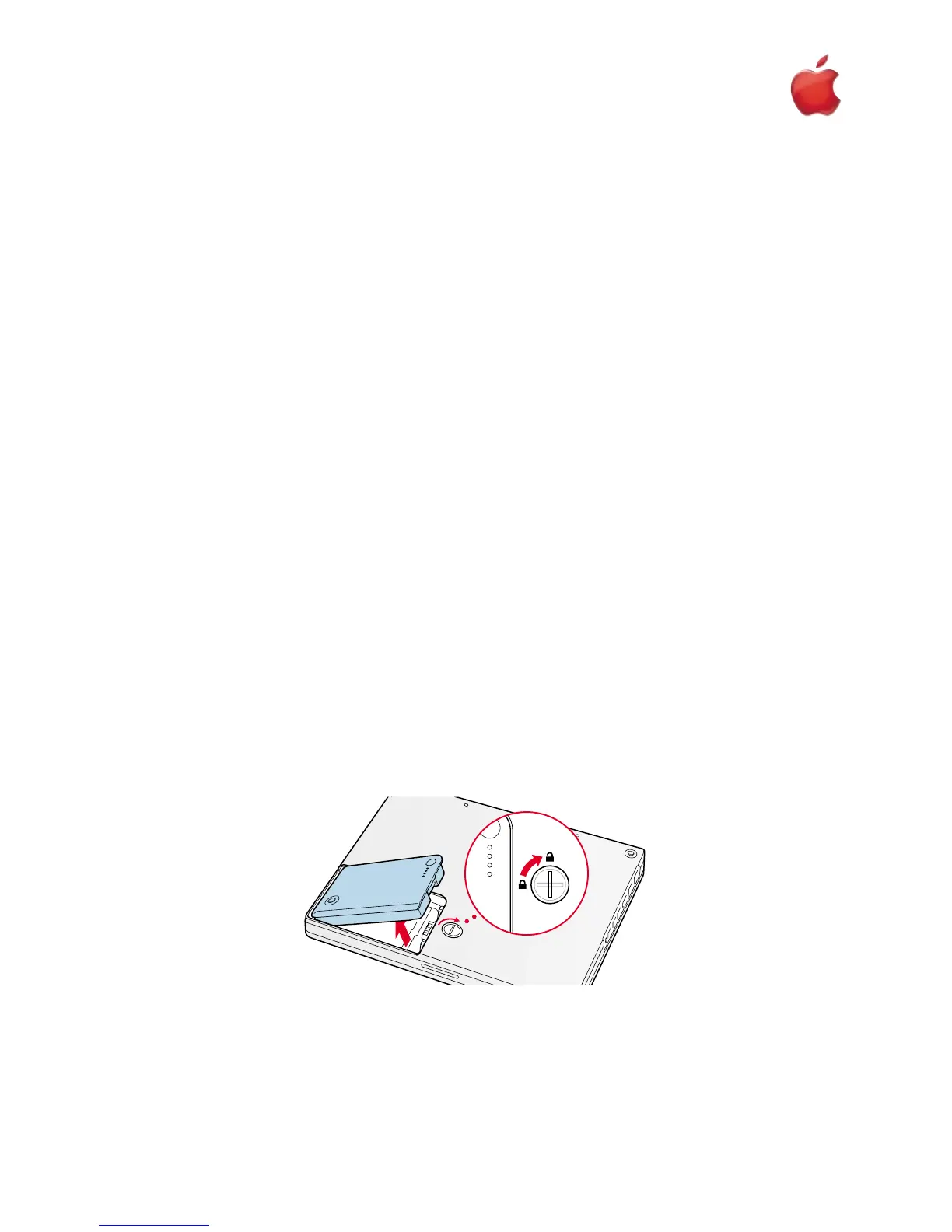
4. Close the computer, turn it over, and locate the battery latch (Figure 1).
Use a coin to turn the battery latch 1/4 turn clockwise to unlock the battery. Gently remove the battery.
Removing the battery will prevent you from accidentally turning on the computer.
Warning : Removing the battery before shutting down your computer may result in data loss.
5. Turn over the computer.
6. Raise the display so you can access the keyboard.
1iBook (Dual USB - Late 2001 - 14.1 LCD - 16 VRAM - 14.1 LCD 16 VRAM) - AirPort Card
English
English
AirPort Card
AppleCare
Figure 1



 To Next Page