Welcome to iPad2
iPad 2 Features
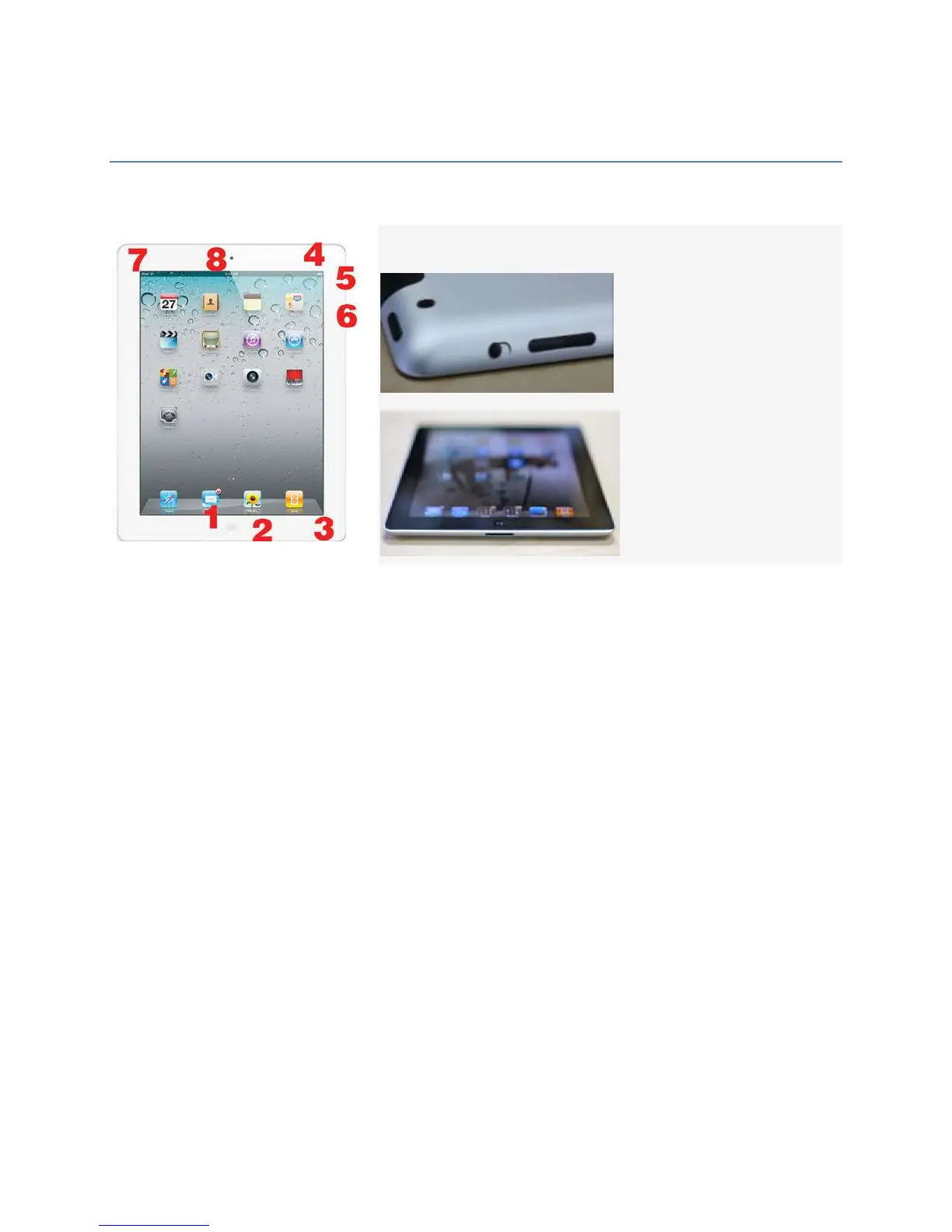
The image above shows the iPad 2 from the front The features present on each side of the
device are explained below, since knowing what each item is will help you to use your
iPad2.
1. Home button. Press this button when you want to exit an app and return to your home
screen. It's also involved in restarting a frozen iPad and rearranging your apps and adding
new screens.
2. Dock connector. This is where you plug in the USB cable to sync your iPad and your
computer.
3. Speakers. The built-in speakers on the bottom of the iPad 2 play music and audio from
movies, games, and apps. The speaker on this model is larger and louder than on the first-
generation model.
4. Hold button. This button locks the iPad 2's screen and puts the device to sleep. It's also
one of the buttons you hold to restart a frozen iPad.
5. Mute/Screen Orientation Lock Button. In iOS 4.3 this button can serve multiple
purposes depending on your preference. Toggling this switch can either mute the volume of
the iPad 2, or be used as a screen orientation lock to prevent the iPad 2's screen from
automatically switching from landscape to portrait mode (or vice versa) when the orientation
of the device is changed.
6. Volume Controls. Use this button to raise or lower the volume of the audio played
through the speakers at the bottom of the iPad 2.
7. Headphone Jack. - Plug in headphones here.



 To Next Page