Screen resolution on your computer set to 1024 x 768 or higher Â
iTunes 10.1.2 or later, available at  www.itunes.com/download
QuickTime 7.6.2 or later (for playing videos recorded with iPhone, on your computer) Â
An Apple ID (such as an iTunes Store account or MobileMe account) for purchases Â
from the iTunes Store or App Store
An Internet connection for your computer (broadband is recommended) Â
Installing the SIM Card
If your SIM card (GSM models) wasn’t preinstalled, you must install it before you can
use iPhone.
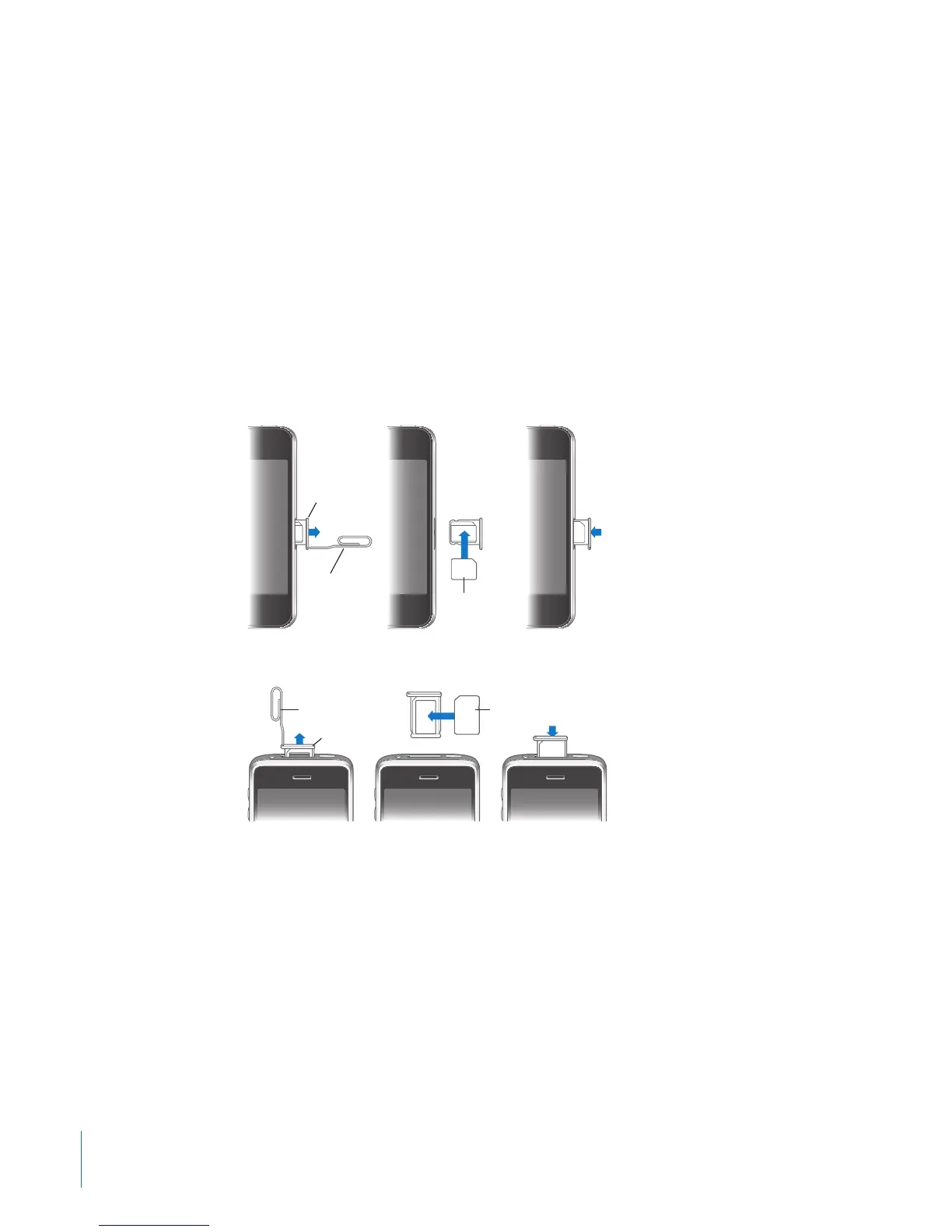
Installing the SIM Card in iPhone 4
Install the SIM card:
1 Insert the end of a paper clip or SIM eject tool into the hole on the SIM card tray.
Push rmly, straight in until the tray pops out.
2 Pull out the SIM card tray and place the SIM card in the tray as shown.
3 With the tray aligned and the SIM card on top as shown, carefully replace the tray.
20
Chapter 2 Getting Started



 To Next Page