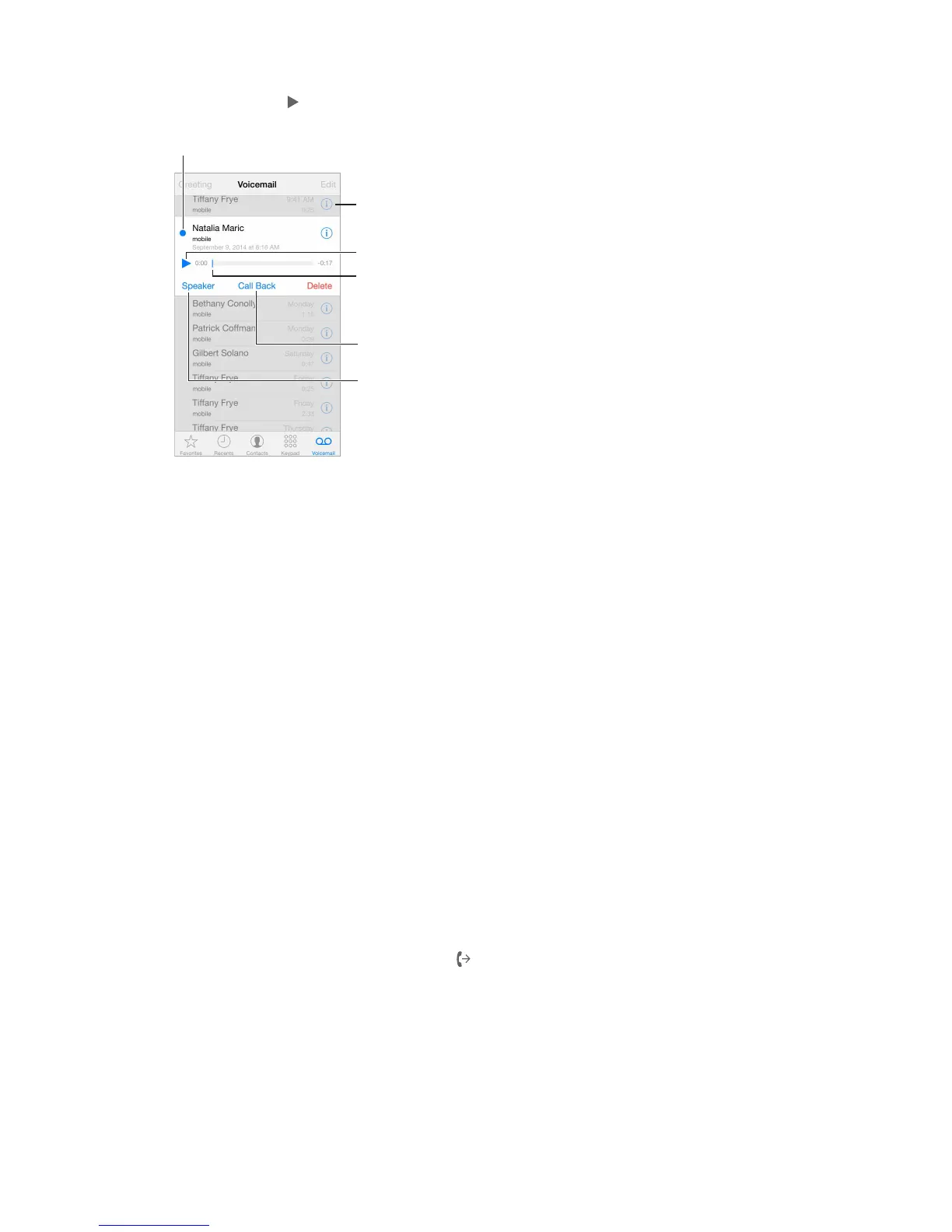
Return the call.
Messages are saved until you delete them or your carrier erases them.
Delete a message. Swipe or tap the message, then tap Delete.
Note: In some areas, deleted messages may be permanently erased by your carrier.
Manage deleted messages. Tap Deleted Messages (at the end of the messages list), then:
•
Listen to a deleted message: Tap the message.
•
Undelete a message: Tap the message and tap Undelete.
•
Delete messages permanently: Tap Clear All.
Update your greeting. Tap Voicemail, tap Greeting, tap Custom, then tap Record. Or, to use your
carrier’s generic greeting, tap Default.
Set an alert sound for new voicemail. Go to Settings > Sounds.
Change the password. Go to Settings > Phone > Change Voicemail Password.
Contacts
When viewing a contact’s card, a quick tap lets you make a phone call, create an email message,
32, Contacts, on page 13 5.
Call forwarding, call waiting, and caller ID
Set up call forwarding, call waiting, or caller ID. (GSM) Go to Settings > Phone.
•
Call Forwarding: The Call Forwarding icon appears in the status bar when call forwarding is
on. You must be in range of the cellular network when you set iPhone to forward calls, or calls
won’t be forwarded.
•
Call Waiting:
•
Caller ID:
For CDMA accounts, contact your carrier for information about enabling and using these
features. See
support.apple.com/kb/HT4515.



 To Next Page