EasyManua.ls Logo

Apple iPhone 5 - Safari

Apple iPhone 5
180 pages
Print Icon
To Next Page IconTo Next Page
To Previous Page IconTo Previous Page
Loading...
7
61
Safari
Safari at a glance
Use Safari on iPhone to browse the web, use Reading List to collect webpages to read later, and
add page icons to the Home screen for quick access. Use iCloud to see pages you have open
on other devices, and to keep your bookmarks, history, and reading list up to date on your
other devices.
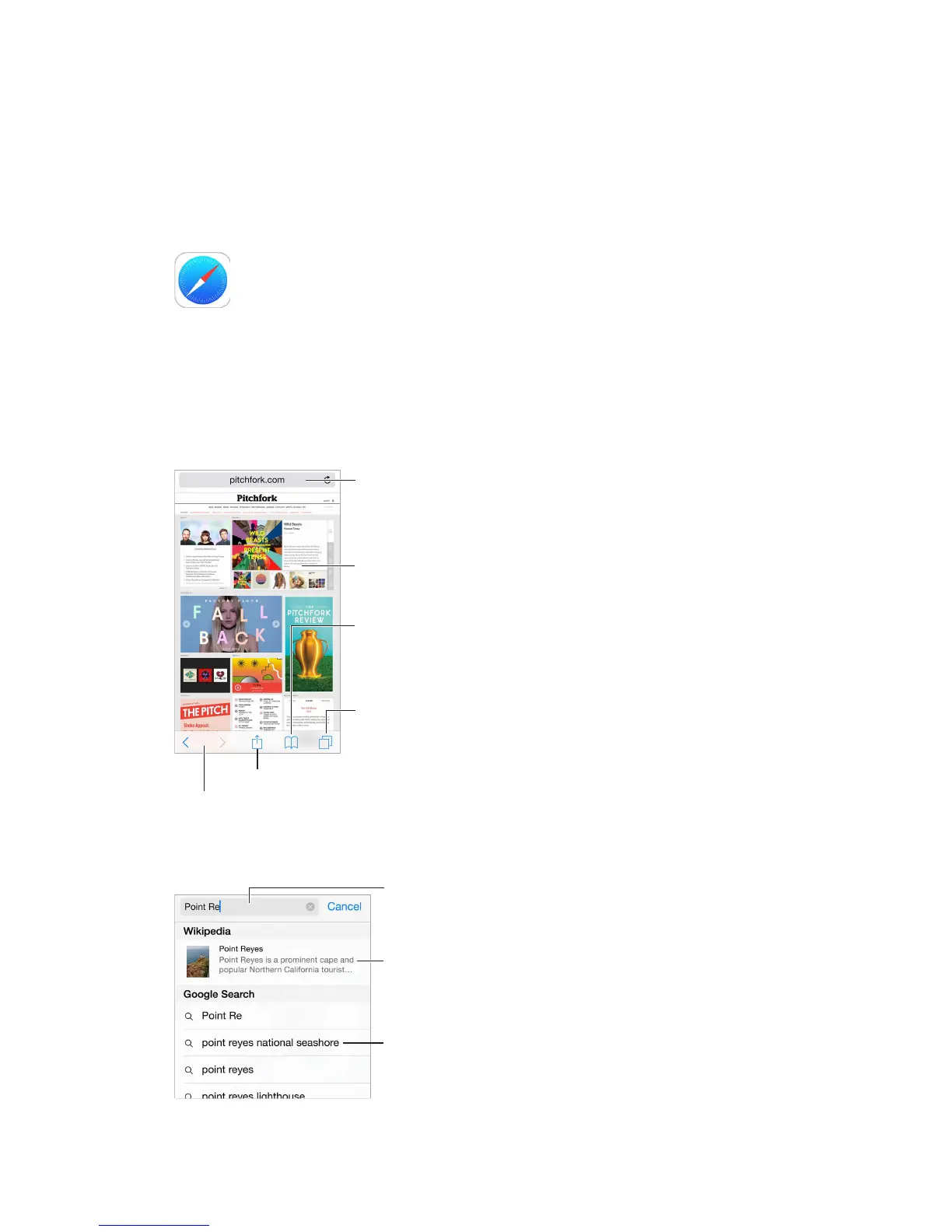
Share, print, and more.
View open tabs or
open a new tab.
View open tabs or
open a new tab.
Enter a web
address or search
item, or get quick
access to your
Favorites.
Enter a web
address or search
item, or get quick
access to your
Favorites.
To zoom, double tap
an item or pinch.
To zoom, double tap
an item or pinch.
See your bookmarks,
reading list, and
shared links.
See your bookmarks,
reading list, and
shared links.
Revisit recent pages.
Search the web
Enter what
youre
searching for,
then tap Go.
Enter what
you’re
searching for,
then tap Go.
Or tap a
suggestion.
Or tap a
suggestion.
View selected
site.
View selected
site.

Other manuals for Apple iPhone 5

Related product manuals