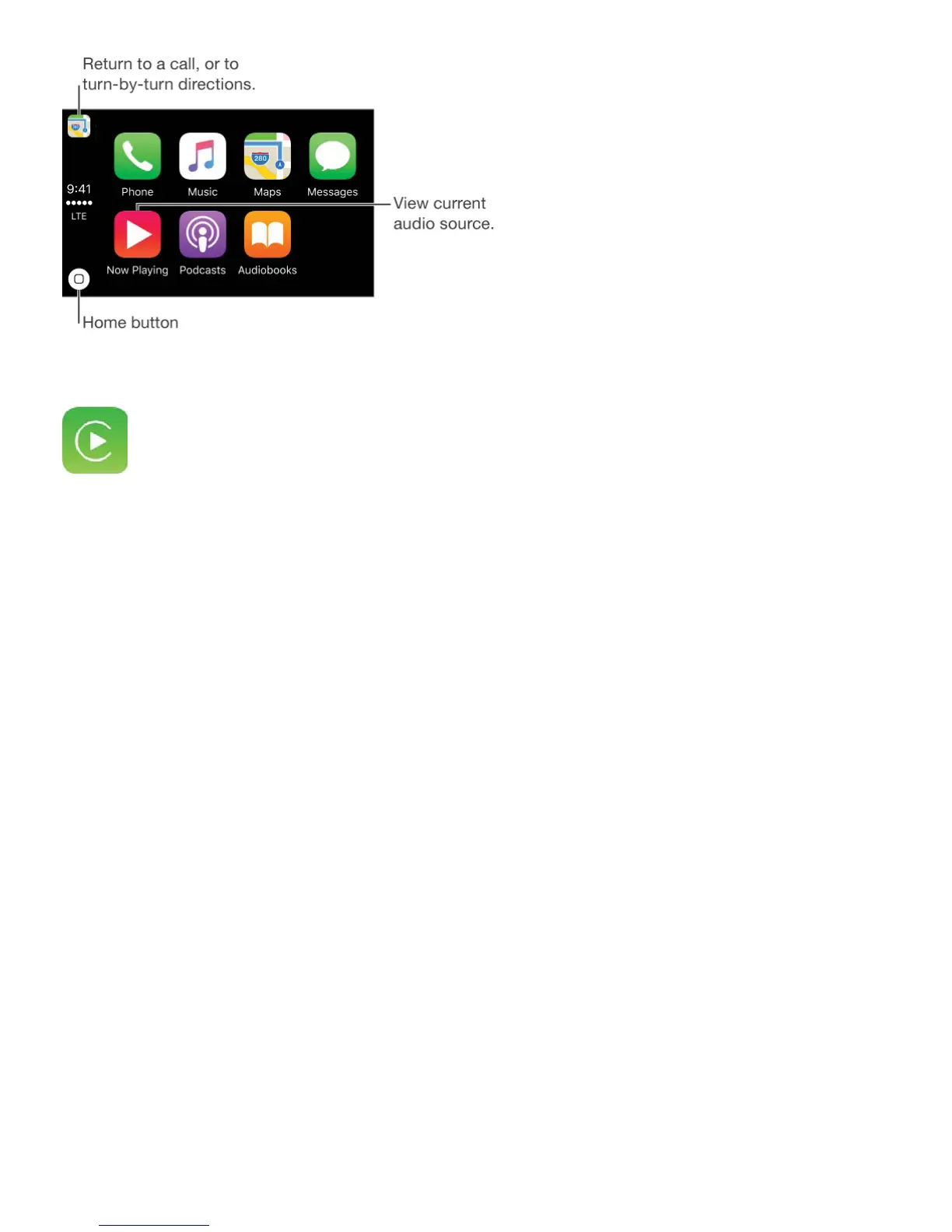
If the CarPlay Home screen doesn’t appear, select the CarPlay logo on your car’s display.
Connect wirelessly to CarPlay. First, make sure your car is in wireless or Bluetooth pairing
mode (see the owner’s guide). On iPhone, go to Settings > General > CarPlay > Available
Cars, then choose your car.
Speak to Siri. Press and hold the voice control button on the steering wheel, or touch and
hold the Home button on the CarPlay Home screen, until Siri beeps. Then make your
request.
Open an app. Tap the app on the touchscreen. Or twist the rotary knob to select the app,
then press down on the knob.
Return to the CarPlay Home screen. Tap the Home button on the touchscreen. Or press
the “back” button near the rotary knob until you get back to the Home screen.
Return to your car’s Home screen. Tap the gray icon with your car’s logo if it appears, or
press the physical Home button on your radio if your car has one.
View additional apps. If you have more than eight apps, some apps may appear on
another page of the Home screen. Swipe left on the touchscreen, or twist the rotary knob.
Return to a phone call or to turn-by-turn directions. (Touchscreen only) Tap the icon in
the upper-left corner of the touchscreen.
Scroll quickly through a list. Slide or tap the letters along the list at the right side of the
touchscreen. Or twist or spin the rotary knob.



 To Next Page