Block unwanted callers. On a contact card, tap Block this Caller (you can see a caller’s
contact card from Favorites or Recents by tapping ). You can also block callers in
Settings > Phone > Blocked. You will not receive voice calls, FaceTime calls, or text
messages from blocked callers. For more information about blocking calls, see
.
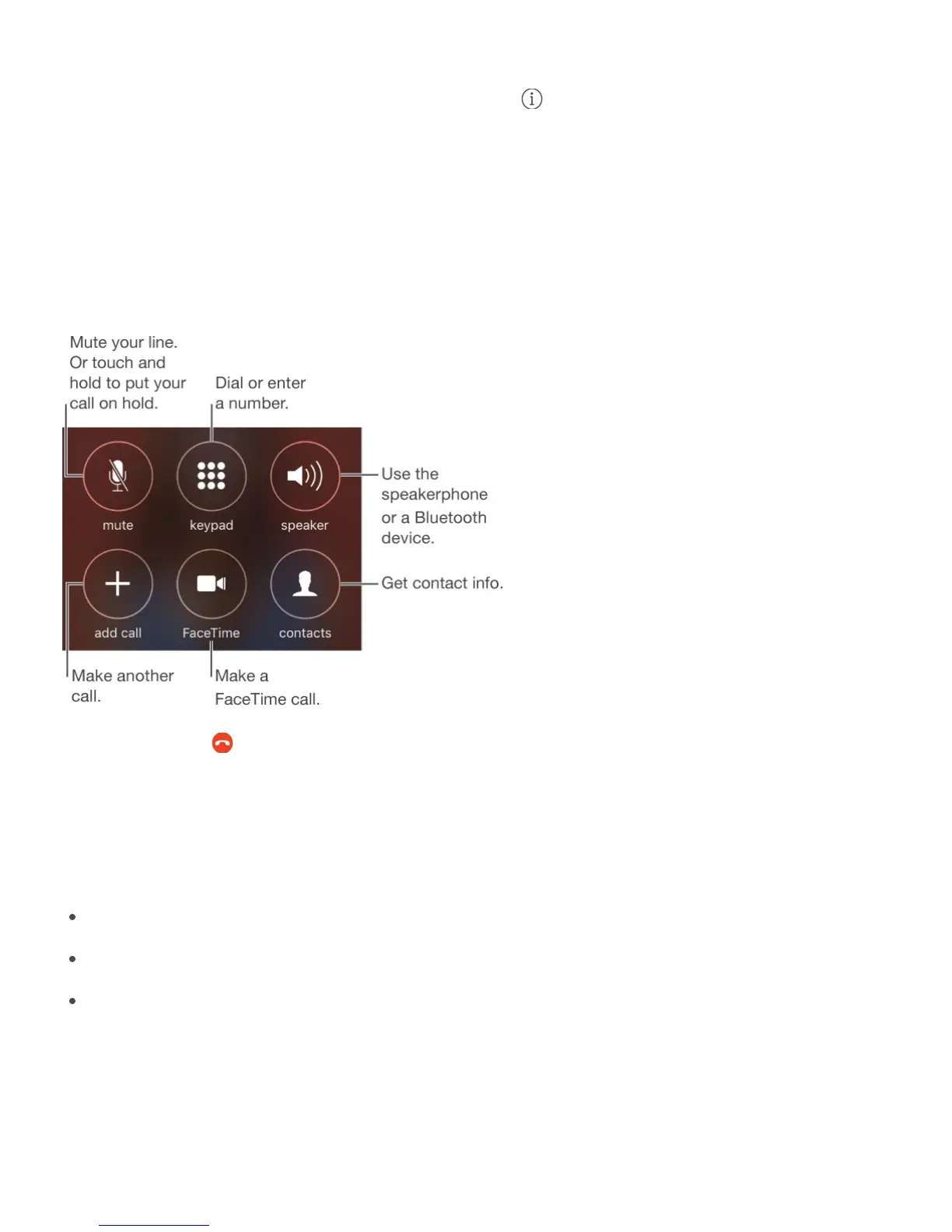
While on a call
When you’re on a call, the screen shows several call options.
End a call. Tap or press the Sleep/Wake button.
Use another app while on a call. Press the Home button, then open the app. To return to
the call, tap the green bar at the top of the screen.
Respond to a second call. You can:
Ignore the call and send it to voicemail: Tap Ignore.
Put the first call on hold and answer the new one: Tap Hold + Accept.
End the first call and answer the new one: When using a GSM network, tap End +
Accept. With a CDMA network, tap End and when the second call rings back, tap
Accept, or drag the slider if iPhone is locked.
With a call on hold, tap Swap to switch between calls, or tap Merge Calls to talk with both
parties at once. See .
support.apple.com/HT201229



 To Next Page