yypg
.
Call, send a message to, or email a contact by pressing his or her phone number in
Contacts.
See a list of recommended games by pressing Games in Game Center.
Change 3D Touch sensitivity. Go to Settings > General > Accessibility > 3D Touch, then
set 3D Touch sensitivity to Light, Medium, or Firm.
Buttons
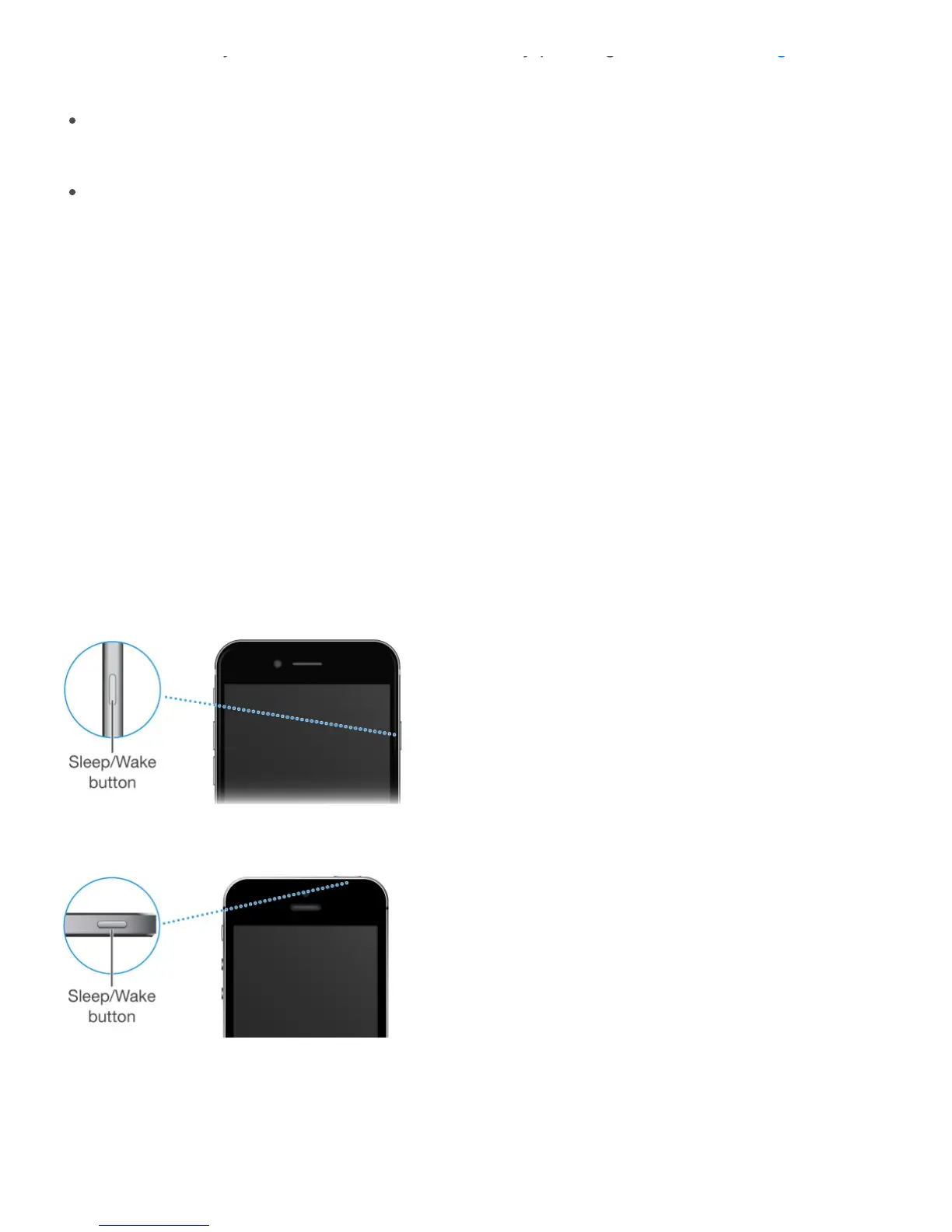
Sleep/Wake button
When you’re not using iPhone, press the Sleep/Wake button to lock iPhone. Locking iPhone
puts the display to sleep, saves the battery, and prevents anything from happening if you
touch the screen. You can still get phone calls, FaceTime calls, text messages, alarms, and
notifications. You can also listen to music and adjust the volume.
On iPhone 6, iPhone 6 Plus, iPhone 6s, and iPhone 6s Plus, the Sleep/Wake button is on
the right side:
On iPhone SE and iPhone 5s and earlier, the Sleep/Wake button is on the top edge:
iPhone locks automatically if you don’t touch the screen for a minute or so. To adjust the
timing, go to Settings > General > Auto-Lock.
Turn iPhone on. Press and hold the Sleep/Wake button until the Apple logo appears.
g
books



 To Next Page