EasyManua.ls Logo

Apple iPod shuffle - Quick Start Guide; Initial Setup and Charging

Apple iPod shuffle
59 pages
Print Icon
To Next Page IconTo Next Page
To Previous Page IconTo Previous Page
Loading...
P
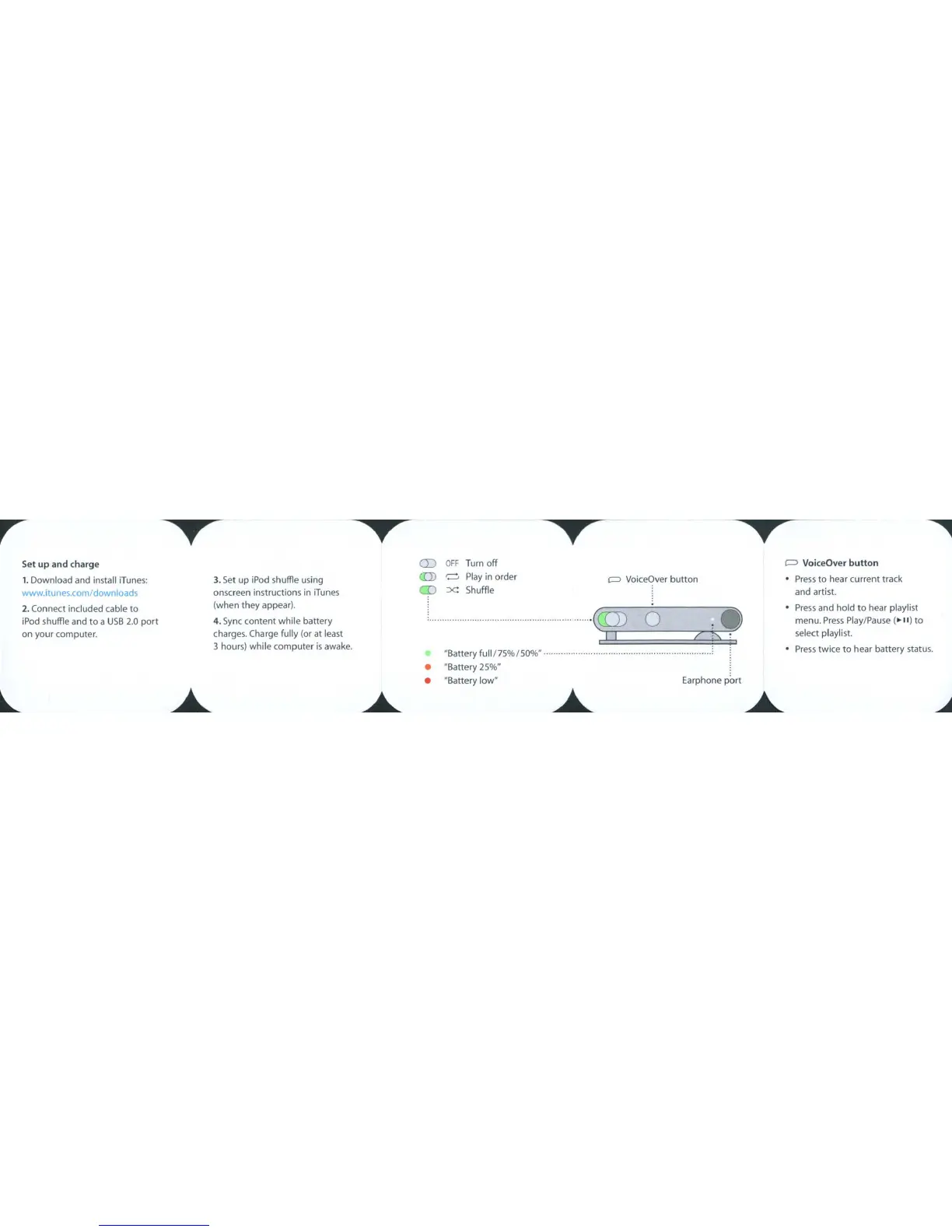
VoiceOver
button
Set
up
and
charge
1.
Download
and
install
iTunes:
www.itunes.com/downloads
2.
Connect
included
cable
to
iPod shuffle and
to
a
USB
2.0
port
on
your
computer.
3.
Set
up
iPod
shuffle
using
onscreen
instructions
in
iTunes
(when they appear).
4.
Sync
content
while
battery
charges. Charge fully (or at least
3
hours)
while
computer
is
awake.
CD
«:D
CD
OFF
Turn
off
~
Play
in
order
:x: Shuffle
qq.~(Q)
I I
"Battery fuIlI7S%/SO%" .
"Battery 2S%"
"Battery
low"
o
Earphone
port
P
VoiceOver
button
Press
to
hear
current
track
and
artist.
Press
and
hold
to
hear playlist
menu.
Press
Play/Pause
(
...
,,)
to
select playlist.
Press
twice
to
hear
battery
status.

Related product manuals