EasyManua.ls Logo

Apple iPod touch (4th generation - Maps; Finding Locations

Apple iPod touch (4th generation
141 pages
Print Icon
To Next Page IconTo Next Page
To Previous Page IconTo Previous Page
Loading...
Maps
18
Finding locations
WARNING: For important information about driving and navigating safely, see the Important
Product Information Guide at www.apple.com/support/manuals/ipodtouch.
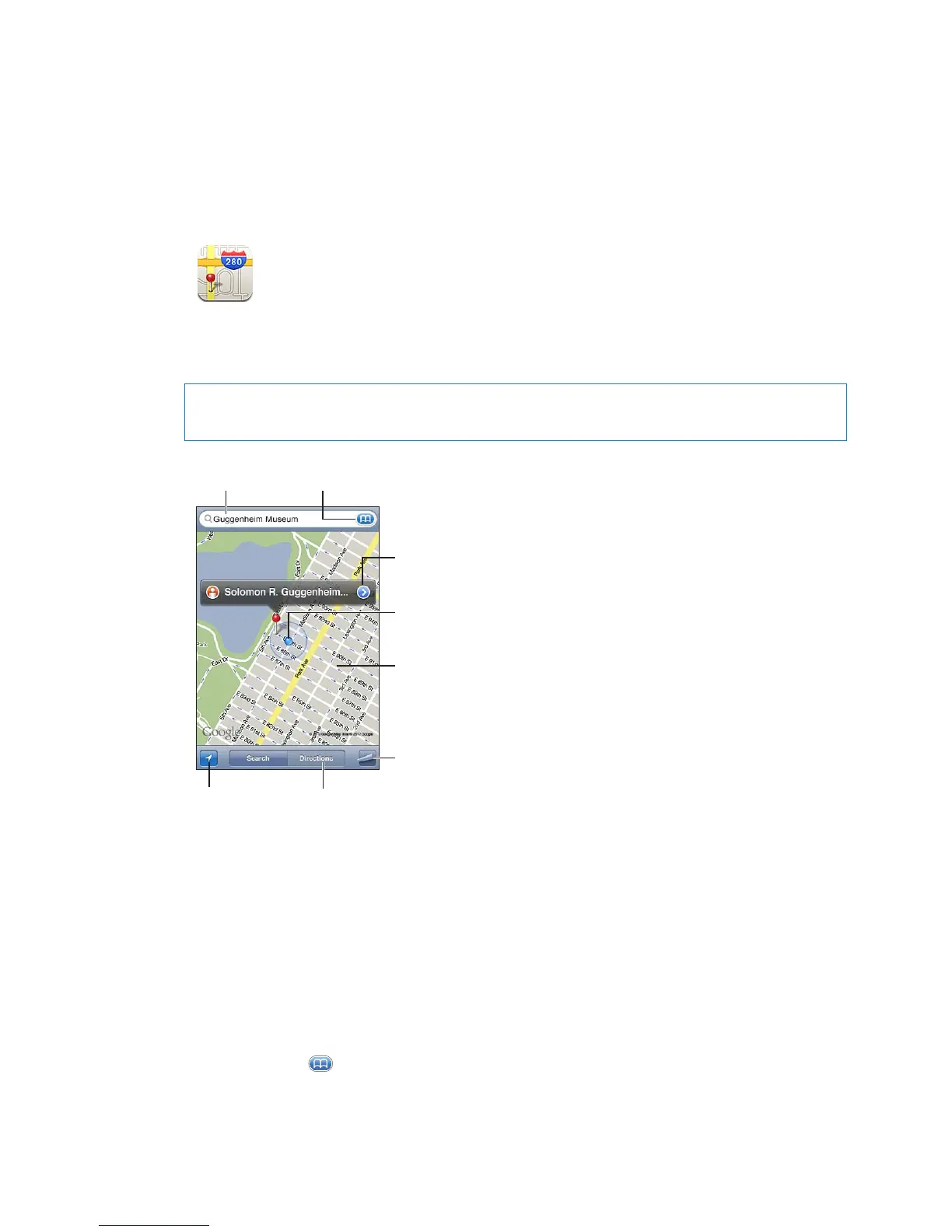
Display the location of a business
or person in your contacts list.
Set options, such as
showing traffic or
satellite view.
More information
Double-tap to zoom in;
tap with two fingers to
zoom out. Or, pinch to
zoom in or out.
Current location
Enter a
search.
Show your
current
location.
Get directions by
car, public transit,
or walking.
Find a location: Tap the search eld to bring up the keyboard. Type an address or other
information, then tap Search.
You can search for information such as:
Intersection (“8th and market”) Â
Area (“greenwich village”) Â
Landmark (“guggenheim”) Â
Zip code Â
Business (“movies,” “restaurants san francisco ca,” apple inc new york”) Â
You can also tap to nd the location of a contact.
81

Related product manuals