MacBook Pro (13-inch) Symptom Charts — Startup and Power Issues 53
2010-09-14
Power Adapter Issue
Unlikely cause: logic board, RAM, display assembly, hard drive, optical drive, top case, speakers,
camera, microphone
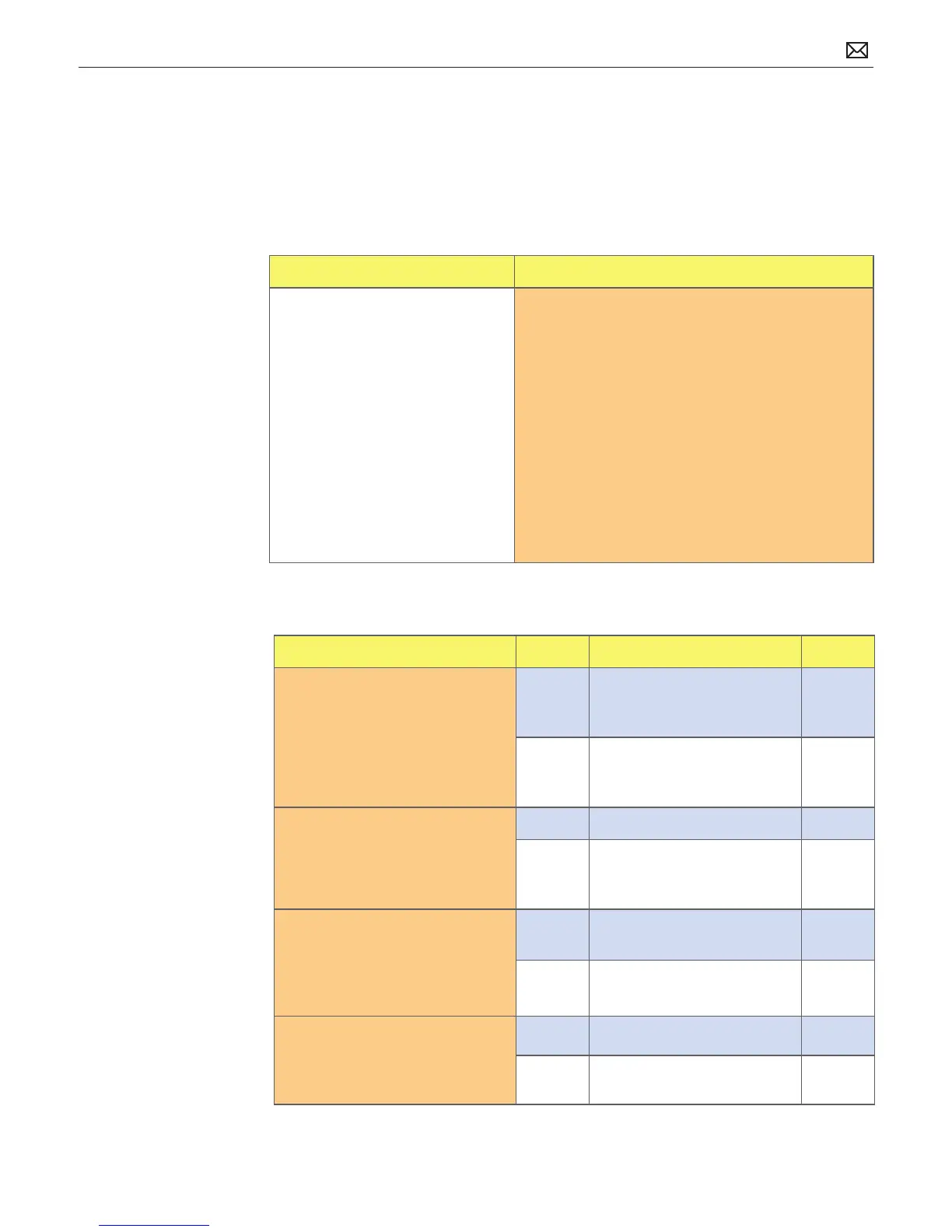
Quick Check
Symptom Quick Check
Power Adapter Issue
• No power
• No Power LED
• Non-operational
• Stuck /broken pin
1. Connect AC adapters MagSafe connector to the
computer. The LED on the connector should be
green or orange/amber.
2. Verify power cord, or plug, is rmly attached to
AC adapter.
3. Verify AC power source is supplying AC power.
4. Check for dirty or stuck pins on the MagSafe
connectors, both on the adapter and the
computer. Use and cleaning of power adapter
with MagSafe
5. Reset SMC by pressing the (left) Shift-Control-
Option keys along with the power button once.
Deep Dive
Check Result Action Code
1. Verify that the MagSafe LED is
green or orange/amber while
connecting a known-good AC
adapter on user system.
Yes SMC on logic board senses AC
power adapter and enabled
power. Go to step 4.
No Verify MagSafe interconnect
board is connected to logic
board. Go to step 2.
2. Does the unit run on known-
good AC power adapter only?
Yes Issued resolved. P99
No Replace the MagSafe
interconnect board.
Go to step 3.
3. Verify the MagSafe LED is
green or orange/amber while
connecting known-good
power adapter on user system.
Yes Bad MagSafe interconnect
board. Issue resolved.
X03
No Go to step 4.
4. Does the user’s power adapter
have stuck or bent pins on the
MagSafe connector?
Yes Replace power adapter. P15
No Go to step 5.



 To Next Page