MacBook Pro (13-inch) Symptom Charts — Display 63
2010-09-14
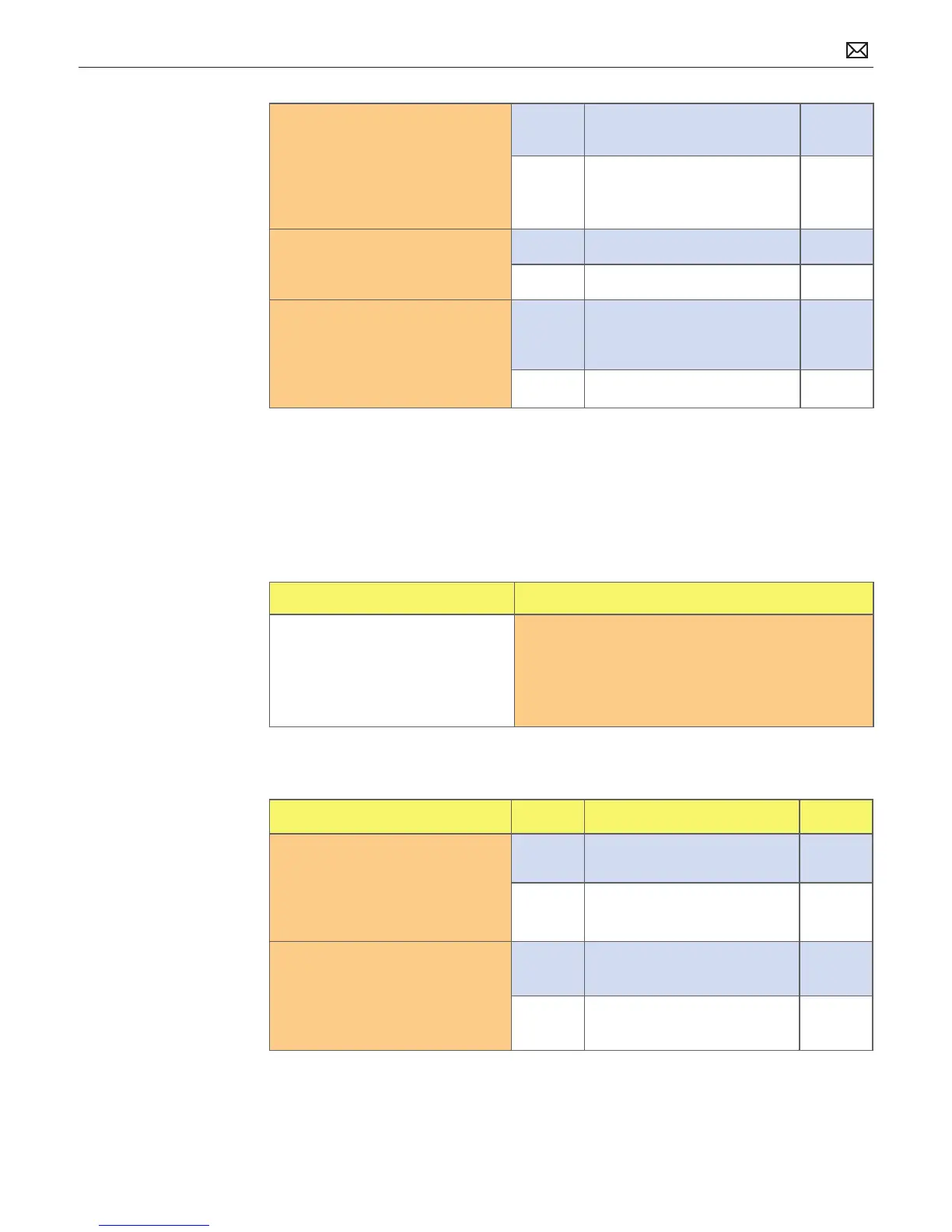
2. Run Clamshell Service
Diagnostic utility and check
for all devices presence. If
not found, inspect and reseat
camera cable on logic board. Is
iSight listed in System Proler?
Yes Camera recognized.
Go to step 3.
No Go to step 4.
3. Launch PhotoBooth. Verify that
camera’s green LED is on and
image appears normal.
Yes Issue resolved.
No Go to step 4.
4. Substitute a known-good
display assembly to test logic
board camera connection.
Is iSight camera operating
properly?
Yes Replace display assembly. X11
No Replace logic board. M13
Blank / No Video
Unlikely cause: Power adapter, speakers, optical drive, hard drive, fan, microphone, top case
Quick Check
Symptom Quick Check
Blank / No Video
• No video
• No backlight
1. Check brightness setting
2. Attach known-good supported external display.
3. Boot from Mac OS X install disc that came with
computer.
Deep Dive
Check Result Action Code
1. Verify boot chime present
when system restarted.
Reset SMC and clear PRAM if
necessary for proper start up. Is
LCD video present?
Yes Go to step 3.
No Go to step 2.
2. Connect known-good
supported external display.
Verify whether image appears
on external display when
system is booted.
Yes External display detected by
system. Go to step 3.
No Go to No Video symptom
code ow.



 To Next Page