7English
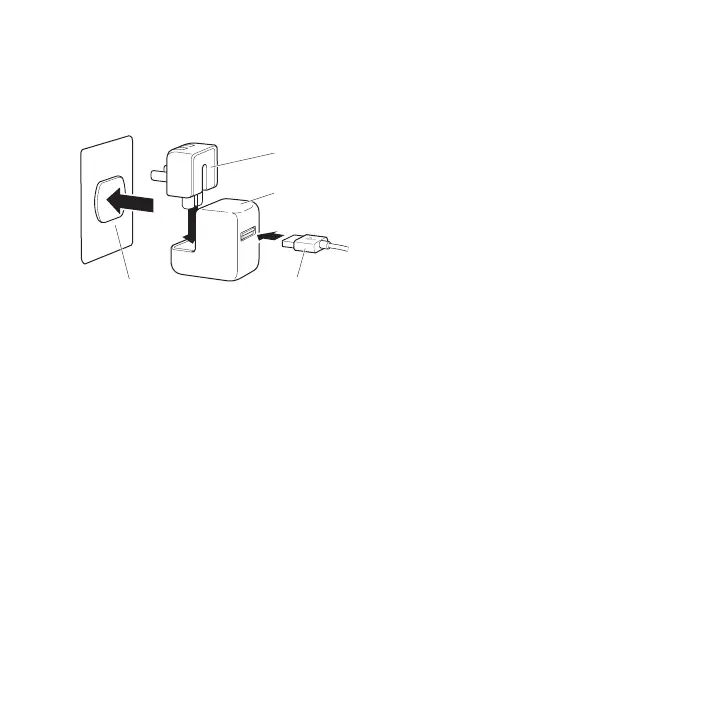
To use the Dock with the Apple USB Power Adapter:
1 Connect the Apple Dock Connector to USB Cable to the power adapter, extend the
electrical prongs (if necessary), and plug the power adapter into a power outlet.
Power outlet USB cable
Power adapter
AC plug
2 Connect the other end of the cable to the Dock.
3 Continue with steps 2-3 on page 5 to use your iPod or iPhone with the Dock and
power adapter.
Viewing Photos and Videos on a TV or Other Video Device
With iPhone and iPod models that support video, you can use the Dock to view
photos and video on a TV or other video device (such as a digital projector). The TV
or other device must have a VGA connector or standard RCA connectors that support
composite video signals. If you’re using the Apple Dock Connector to VGA Adapter, you
also need to connect the Dock to speakers or stereo (using an audio cable, available
separately). The Apple Composite AV Cable and the Apple Component AV Cable will
also route audio to your TV or other video device.



 To Next Page