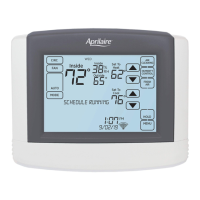
SCHEDULE AND HOLDS
SCHEDULE HOLDS
Temporary Hold
1. Touch the or arrows to set
your desired temperature. The Set
Temporary Hold pop-up will appear.
2. The temporary hold will run until the
current schedule event ends. You can
select a different time by touching
the
or arrows on the Set
Temporary Hold pop-up.
3. Touch Done to close the Set
Temporary Hold pop-up.
4. To cancel the hold, touch HOLD on
the main screen then Cancel Hold
on the Set Temporary Hold pop-up.
Permanent Hold
1. Touch the or arrows to set
your desired temperature. The Set
Temporary Hold pop-up will appear.
2. Touch Switch to Permanent Hold.
The Set Temporary Hold pop-up will
change to a Set Permanent Hold
pop-up. The time and the
and
arrows will be grayed-out.
3. Touch Done to close the Set Hold
pop-up.
4. To cancel the hold, touch HOLD on the
main screen then Cancel Hold on the
Set Permanent Hold pop-up.
19
1
1
2
3
3
4
4
4
2
4



 To Next Page
 Loading...