折页方式:
折页成型(英文在正面):
为折线(不印刷)
146 说明书
AP-146-PR-01
20200925
版 本
V1.0
Ingrid
深圳市爱图仕影像器材有限公司
70g 书纸,正反两面印刷
料号:514600060003
-2- -3--1-
Thank you!
Instructions
Product Manual
English
Thank you for purchasing the Aputure Accent B7c, the RGBWW Smart Bulb
designed for filmmakers.
Please read and comprehend all of the following instructions before
using this product..
Keep this product manual and always include it when passing the
product onto third parties.
Only use a microfiber or dry cloth to clean the product.
Be careful to prevent damage to this light that can occur from impacts,
such as dropping or hitting the fixture.
Do not leave the product in environments with excessive heat; high
temperatures can cause the product to overheat and malfunction.
Please do not place the fixture near any liquids or other flammable
objects.
If you encounter any issues with this product, please have it checked by
an authorized service or repair agent. Please note that this warranty
does not apply to any repair required due to unauthorized disassembly,
although you may request such repairs on a chargeable basis..
The product is certified by RoHS and CE. Please operate the product in
full compliance with these operation standards. Please note that this
warranty does not apply to repairs arising from malfunctions, although
you may request such repairs on a chargeable basis.
The instructions and information in this manual are based on thorough,
controlled company testing procedures. Further notice will not be given
if the design and specifications change.
WARNING! The temperature of the exterior shell of the fixture can rise
quite quickly when powered on for an extended period of time. Please
exert caution when touching the fixture, especially when using the
onboard buttons to adjust settings.
Components List
Product details
Accent B7c (1 pc) Carrying Pouch (1 pc)
Diffusion Cover
Operation Instructions
-4- -5-
-7- -8--6-
1. Power On/Off
”+” Brightness Button”-” Brightness Button
Power Button
Press the power button in the center of the light to toggle the fixture
on or off.
When in "Standby Mode," short-press the power button once to
toggle the fixture on and off.
To fully shut down the fixture or to turn it off from a shutdown state,
long-press the power button for 3 seconds.
When the bulb powers on from a standby or off state, it will resume
its previous settings.
6. Charging the Internal Battery
How to Charge the Battery
The B7c charges once it is inserted into a compatible lamp socket
(E26/27) with power. If the LEDs are active and outputting light, the
B7c’s internal battery charges slowly. When the B7c is in standby
mode or is powered off, the bulb charges more quickly and can
complete a full charge cycle (0-100%) in approximately 2 hours.
If the bulb’s internal temperature exceeds 45°C, a protection
mechanism activates, and all charging processes cease until the
light’s internal temperature cools to below 45°C.
Battery Charging Speeds
In the fastest charging scenarios, the B7c can charge up to:
- 50% in 45 minutes
- 80% in 74 minutes
- 100% in 120 minutes
Checking the Charging Status
When the bulb is in standby mode or is powered off, press the “+” or
“-” buttons to initiate a status check. If the battery is charging, the
bulb will pulse three times at 3200K. If the battery is fully charged,
the bulb will light up for 3 seconds at 3200K.
8. Sidus Link App Control
1) Sidus Link App Control allows you to more precisely adjust all of
the output settings of the Accent B7c, including fine-tuning CCT and
brightness, in addition to accessing the light’s HSI color-tunability,
and nine built-in lighting effects, including Paparazzi, Fireworks,
Faulty Bulb, Lightning, TV, Party, Pulsing, Cop Car, and Fire.
7. Preventing Overheating
The ambient operating temperature of the Accent B7c is -10 ~ 40°C.
This product utilizes a built-in lithium battery. To enhance the
battery's stability and longevity, we use high-temperature-resistant
batteries, which can be used in an environment of -10 ~ 40°C.
Keeping the ambient temperature well below 40°C is recommended
to ensure that the B7c does not experience any overheating issues.
Facing the bulb upright also provides the best airflow; however, the
B7c is operable in any position.
If the light enters a "Battery Protection Mode," it will be able to
resume operation once the internal temperature of the components
cools down.
Standard/AC Mode
In Standard (AC) Mode, if the bulb's internal temperature exceeds
80°C, it enters a "Battery Protection Mode," wherein the battery and
LEDs are powered off to protect and cool the internal components.
Battery/DC Mode
In Battery (DC) Mode, if the bulb's internal temperature exceeds
70°C, the maximum output power of the light is reduced to 80%.
Should the internal temperature continue to rise and exceed 73°C,
the light enters a "Battery Protection Mode," wherein the battery
and LEDs are powered off to protect and cool the internal
components.
2) Using the Sidus Link APP
2. CCT Mode
You can toggle through the six built-in CCT presets by
double-pressing power button: 2000K, 2700K, 3200K, 4300K, 5500K,
6500K. You can also adjust the B7c’s CCT more precisely between
2,000K-10,000K using the Sidus Link App.
3. Brightness
You can toggle through ten steps of brightness adjustment using
the onboard controls, or choose a precise output level using the
Sidus Link App. Press the“+” button to increase the brightness or
press the “-” button to decrease the brightness. This will cycle
between 10 dimming presets between 10% to 100%. You can also
adjust the brightness more precisely using the Sidus Link App.
4. Bluetooth Mode
Simultaneously long-press the power button and the "+" or "-"
button for 5 seconds to reset the fixture's Bluetooth configuration.
When the Bluetooth Reset sequence initiates, the bulb will proceed
to pulse red, green, then blue in sequence. Then you can connect to
the B7c using the Sidus Link App.
5. Power Supply Modes
This fixture can operate in two different power supply modes
Standard (AC) Mode and Battery (DC) Mode.
Standard/AC Mode
In Standard (AC) Mode, the bulb behaves as a regular light bulb and
turns on when it receives power from a lamp socket (E26/E27). When
the lamp the bulb is installed in is switched off, the bulb will also
immediately turn off.
Battery/DC Mode
In Battery (DC) Mode, the bulb switches to its internal battery power
when it does not receive any AC power from a lamp. Switching
between these states causes the light to turn off for a brief moment,
before resuming its previous settings.
Switching Between Modes
To switch between the two modes, simultaneously press the power
button, the “+” button, and the “-” button. To signify that it is in
Standard (AC) Mode, the bulb emits a green glow at 30% brightness,
and then slowly fades to 0%. To signify that it is in Battery (DC)
Mode, it gradually fades into a green glow from 0% to 30%
brightness.
Checking the Power Supply Mode
To determine which mode the bulb is currently in, long-press the
power button for 3 seconds. If the light pulses green three times,
the bulb is in Standard (AC) Mode. If the light turns on at 10%
brightness, then the fixture is in Battery (DC) Mode.
Specifications
Aputure Imaging Industries Co., Ltd.
Add: F/3, Building 21, Longjun industrial estate,
HePing West Road, Shenzhen, Guangdong
E-MAIL: cs@aputure.com
Sales Contact: (86)0755-83285569-613
Aputure Imaging Industries Co., Ltd. warrants the original consumer purchaser
from defects in material and workmanship for a period of one (1) year after the
date of purchase. For more details of warranty visit www.aputure.com
Serial No.
Item Name
Purchase Date
Buyer Name
Buyer Phone
Buyer Add
Franchiser Seal
Add: F/3, Building 21, Longjun Industrial Estate, Heping West Road, Shenzhen, Guangdong
Aputure Imaging Industries Co.,Ltd.
Inspection: Qualified
Intended Use
Intended use of the Aputure Accent B7c includes:
The user has read the instructions of this manual.
The user is using the products within the operating conditions and
limitations described in this product manual.
“Improper use” means using the products other than as described in
these instructions or under operating conditions which differ from those
described herein.
Function/Mode
Bluetooth Reset
* This data reflects the average illuminance of the light at these distances. The
actual values may shift slightly between different lights.
** These luminance values are measured at the brightest point of the bulb, directly
above the fixture.
Photometrics
CCT
2000K
2700K
5500K
3200K
4300K
0.3M
470 lux
860 lux
1095 lux
885 lux
970 lux
1M
46 lux
87 lux
110 lux
89 lux
100 lux
2M
12 lux
22 lux
28 lux
23 lux
26 lux
0.5M
180 lux
330 lux
430 lux
6500K 1180 lux 124 lux 32 lux460 lux
345 lux
370 lux
Accent B7c
You can download the Sidus Link app from the iOS App Store or
Google Play Store to enhance the light's functionality. Please visit
sidus.link/app/help for more details regarding how to use the app to
control your Aputure Lights.
Voltage Input
Current Input
Power Input Maximum
CRI
Power Output Maximum
(LED Light Source)
CCT
SSI (D55)
CQS
SSI (Tungsten)
Lamp Socket Type
Control Methods On-board Controls, Sidus Link App
Bluetooth MeshWireless Connectivity
Lumens
TLCI
Operation Temperature
Lithium-polymer Battery
Charging Time
Battery Life
Cooling Mode
Dimension
100V~240V
12W
95+ (2,500K-10,000K)
2,000K-10,000K
96+ (2,500K-10,000K)
95+ (ave. 2,500K-10,000K)
85
74
570
E26/E27
7W
-10~40
°C
1300mAh 7.4V
2h (When in standby mode or powered off)
Max Brightness: 70+minutes;
Min. Brightness: 20+hrs
Passive Cooling
φ70mm*118mm/φ2.75*4.64in
Weight 240g/0.529lb
-9-
Detailed product manual can be found on
www.aputure.com
-10-
Light Distribution Curve
400*240mm 折页尺寸:80*120mm
Quick Start Color Code Guide
As the B7c has no screen, we've programed some color sequences
to signify different actions. Here is a quick reference guide.
Charging in Progress
Fully Charged
Switch to Standard (AC)
Mode
Switch to Battery (DC)
Mode
Checking AC Mode
Checking the Battery
Charge Level
Trigger
Simultaneously long-press
the power button and the
"+" or "-" button for 5
seconds.
When the bulb is in
standby mode or is
powered off, press the
"+" or "-" buttons.
When the bulb is in
standby mode or is
powered off, press the
"+" or "-" buttons.
Simultaneously press the
power button, the "+"
button, and the "-" button.
Simultaneously press the
power button, the "+"
button, and the "-" button.
When not connected to
AC power, to confirm that
the light is in AC mode,
long-press the power
button for 3 seconds.
You can check the B7c
charge level in any mode.
To perform a check,
simultaneously press the
"+" and "-" buttons.
Sidus.link/app/help
Get Sidus Link
R
App
Degrees off Axis
Percentage of Light Distribution
≤0.25A
Light Pattern
The light will flash Red,
Green then Blue.
The light will output
3200K at 10% brightness,
pulsing three times.
The light will output
3200K at 10% brightness
for three seconds.
The light will emit green
at 30% output, then
gradually dim to 0%.
The light gradually fades
into a green glow from
0% to 30% brightness.
The light will pulse green
at 10% brightness 3 times.
The bulb will pulse with
blue light, with the
number of pulses
corresponding to its
charge level.
1 Pulse = 0-20%
2 Pulses = 20-40%
3 Pulses = 40-60%
4 Pulses = 60-80%
5 Pulses = 80-100%

 Need help?
 General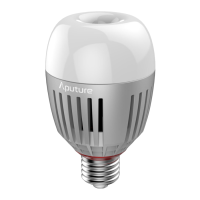

 To Next Page