The Aqara Smart Smoke Detector is a self-contained photoelectric smoke detection alarm designed to detect fires by sensing smoke. It integrates with the Aqara ecosystem, requiring an Aqara Zigbee 3.0 hub for full functionality, and is compatible with Apple HomeKit when used with a compatible Aqara hub.
Function Description:
When the smoke concentration reaches a pre-configured threshold, the detector immediately triggers a sound and light alarm. Simultaneously, it sends a notification to the user's mobile phone via the connected hub, alerting them to the potential danger and prompting immediate action to troubleshoot the situation and prevent serious fire accidents.
The device features a Silence/Self-Test Button with multiple functions:
- Reset: Press quickly three times.
- Silence: Press once during an alarm to silence the buzzer for 10 minutes. If the fire hazard is eliminated and smoke concentration drops below the threshold, the detector returns to normal working status. Holding the button for more than 3 seconds during silence restores the alarm sound prompt function.
- Self-Test: Press and hold for over 3 seconds. This initiates a self-test sequence where the indicator flashes red, yellow, and green in turn, accompanied by three beeps from the buzzer, confirming normal operation. A monthly self-test is recommended.
- Communication Distance Test: Press once to test the communication range with the hub.
The detector provides visual feedback through an indicator light (Red/Yellow/Green) and audible feedback via a buzzer, signaling various statuses:
- Normal Monitoring: Green light flashes once every 56 seconds (after power indicator is on), with no sound.
- Self-Test: Red, yellow, and green colors flash in turn (one second duration per flash, three-flash pause), with one beep per second (three-beep pause).
- Fire Alarm: Red light flashes once per second, with one beep per second (three-beep pause).
- Linkage Alarm: Red light flashes once every 4 seconds, with one beep per second (three-beep pause).
- Fault: Yellow light flashes three times every 48 seconds, with three beeps every 48 seconds. This indicates the detector is unable to detect smoke normally.
- Low Battery: Yellow light flashes once every 48 seconds, with one beep every 48 seconds.
Important Technical Specifications:
- Model: JY-GZ-03AQ
- Battery: DC 3V (CR17450)
- Wireless Protocol: Zigbee
- Dimensions: Ø104.6 × 42 mm
- Operating Temperature: 0°C ~ 40°C
- Operating Humidity: 0 ~ 95% RH, no condensation
Usage Features:
- Add Device: Requires the Aqara Home app and an Aqara Zigbee 3.0 hub. Users must remove the battery protective film, install the battery, and then add the "Smart Smoke Detector" via the app's "Add Device (Accessory)" page. If adding fails, moving the product closer to the hub is suggested.
- Installation:
- At least one detector per independent room.
- Install in the middle of the roof, at least 0.5 meters from any wall.
- Avoid kitchens, areas near water heaters with combustible smoke particles, places with high moisture (e.g., bathrooms), dusty areas, near fans/air conditioners/fresh air entrances with fast wind speeds, wall corners, or spire room tops with poor airflow.
- Avoid installation near fluorescent lamps due to electromagnetic interference.
- Operating temperature range: 0°C to 40°C.
- Install horizontally. If slanting installation is unavoidable, the dip angle should not exceed 45 degrees.
- Do not install in new buildings until renovations and dust-generating processes are complete.
- Installation Methods:
- With Screws: After battery installation and self-test confirmation, choose a suitable roof position. Use an impact drill to punch holes according to the mounting plate, install expansion tubes, secure the mounting plate with self-tapping screws, and then align the "△" mark on the detector with the mounting plate and rotate clockwise to fix it. Screws are recommended for more secure installation.
- With Adhesive: After battery installation and self-test confirmation, remove the protective film from one side of the adhesive sticker and stick it to the back of the mounting plate. Choose a smooth, clean, and dry roof surface. Avoid wall paint or other coatings as the adhesive may peel. Remove the protective film from the other side of the sticker, press the mounting plate firmly for 30 seconds (recommended to leave for 24 hours before installing the detector), then align the "△" mark on the detector with the mounting plate and rotate clockwise to fix it.
- False Alarms: May be triggered by cooking fumes/steam, condensation due to wet weather, incense/electric mosquito incense, spraying paint/air freshener/pesticide, or massive dust accumulation inside the detector.
Maintenance Features:
- Fault Handling: If a fault occurs (yellow indicator flashes three times every 48 seconds, three beeps), contact after-sales service. Pressing the silence/self-test button during a fault silences the buzzer for 8 hours; holding it for more than 3 seconds restores the fault sound prompt.
- Low Battery: When the yellow indicator flashes once every 48 seconds with one beep, replace the CR17450 battery as soon as possible, ideally within 7 days.
- Battery Replacement:
- Remove the detector from the mounting plate by rotating it counterclockwise.
- Remove the old battery with a screwdriver.
- Load a new CR17450 battery, ensuring correct polarity.
- Perform a self-test (hold silence/self-test button for >3 seconds) to confirm normal operation.
- Align the "△" mark on the detector with the mounting plate and rotate clockwise to fix it.
- Cleaning: Monthly cleaning of the detector cover is recommended to remove dust or dirt using a brush or dry lint cloth.
- Precautions:
- Dismantle the detector before construction/renovation activities that generate dust to prevent dust accumulation and false alarms.
- Do not disassemble or repair the detector yourself.
- The "fire alarm" reporting function via wireless network is affected by installation environment, network conditions, hub connection, mobile phone conditions, and app authorization. The manufacturer does not guarantee reliability or timeliness.
- The "silencing" function should only be used after confirming the absence of a fire hazard to prevent accidents.
- CAUTION: Risk of explosion if battery is replaced by an incorrect type. Dispose of used batteries according to instructions. Do not ingest battery (chemical burn hazard). Keep away from children if the battery compartment does not close securely. Seek immediate medical attention if batteries are swallowed. Avoid disposing of batteries in fire/hot oven, or mechanically crushing/cutting them, as this can cause explosion. Avoid high/low temperature environments that can lead to explosion or leakage of flammable liquid/gas. For replaceable battery smoke alarms, follow instructions if a battery fault warning is emitted.

 Need help?
 General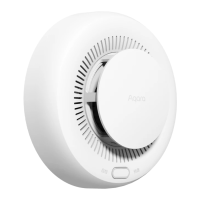

 To Next Page