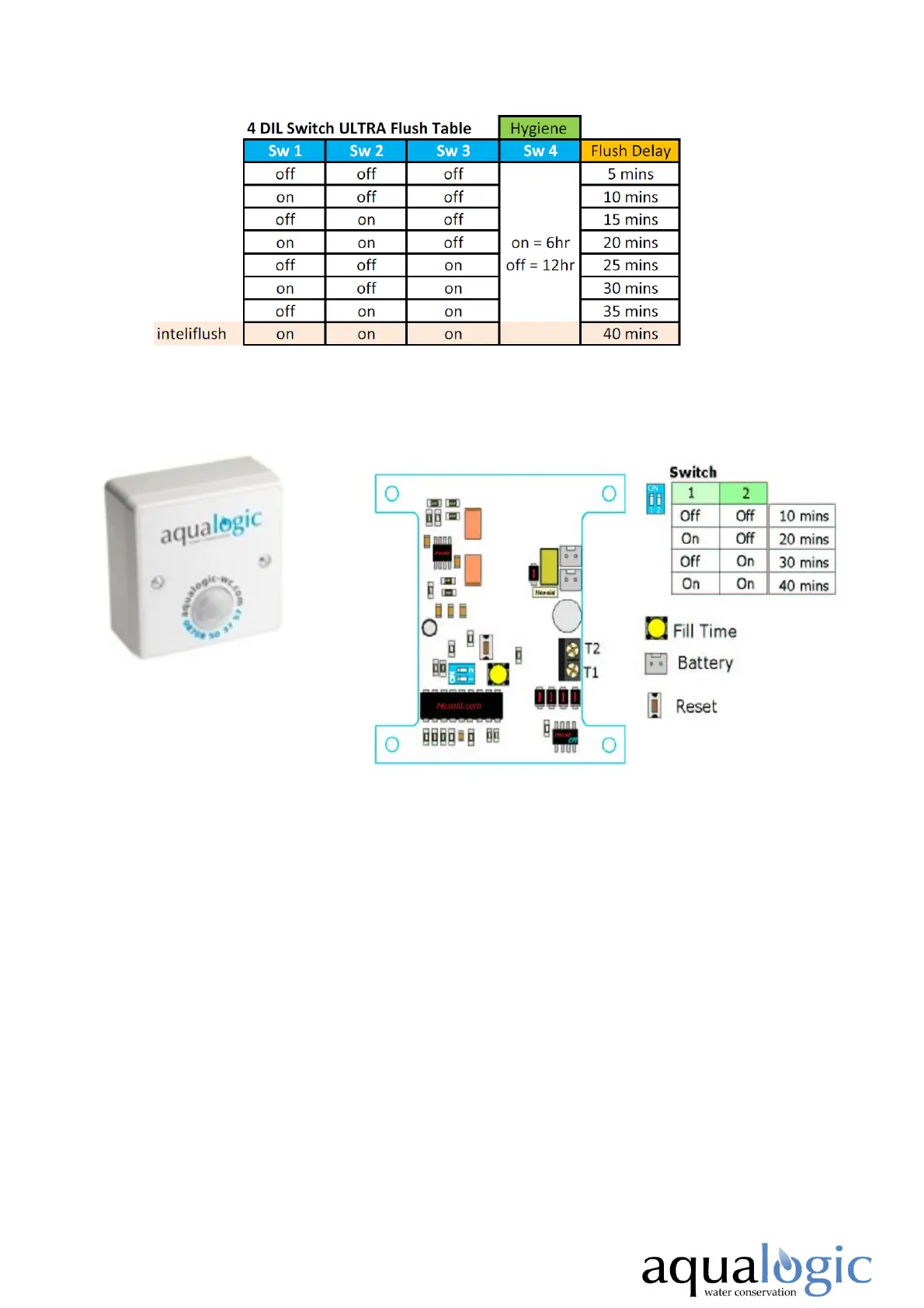
1. Using the Blue DIL Switch, select the flush frequency, see above
table for frequency options.
2. Connect your CR-P2 battery to either Battery Connector terminal.
3. Press the Reset button. The Hydrocell will deliver a one second
burst of water. The Hydrocell will enter test mode after 20 seconds.
On detecting movement the valve will click. Before setting the fill
time the cistern must be empty. (If the cistern is not empty: Press
the Yellow fill button to open the valve, wait until the cistern begins
to flush, then press the Yellow fill button again to close the valve.
The Cistern will now be empty. Press Reset Button again.)
4. Press and release the Fill Time button once. The solenoid valve will
open and allow water to flow into the cistern. When the cistern
begins flushing, press and release the fill button to close the valve.
5. Carefully refit the fascia to the housing and secure with supplied
screws.
Hydrocell 2006 & Ultra
Hydrocell 2006 Control Panel
Hydrocell 12 Ultra - 4 Dill Switch Programming Table


 To Next Page
 Loading...