5
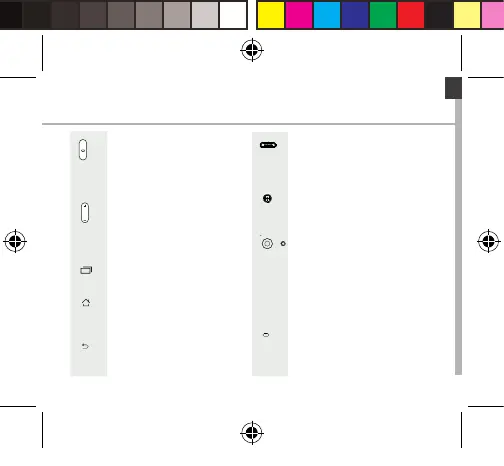
ON/OFF: when the device
is off, long press to turn on.
When the device is on, short
press to turn off the screen and
long press to display options.
Volume +/-: press +/- to adjust
the volume. When you press
the button, notication options
are displayed. You can select
the most appropriate one.
Recent apps: press to display
recent apps.
Home: short press to return to
the homescreen, long press to
access Google Now.
Back: press to go back to the
previous screen.
Micro-USB port: plug the
provided cable to charge the
device or to connect it to a
computer.
Headphone jack: connect the
provided earphones to make
hand-free calls.
Camera & Flash: take pictures
or make movies. To extend
movies duration, insert a
micro-SD card. Activate
the ash option in a dark
environment and use it as
a torch through the quick
settings.
Light sensor: it turns off the
screen when the device is close
to your ear during a call.
ARCHOS 55 Helium Plus book.indd 5 01/07/2015 11:49:45





 To Next Page