16
Batteries
Remote control is supplied without batteries; before use remote control
open the batteries holder placed on the back of remote control (refer to
the diagram shown on the back of the remote control) and insert 1 battery
CR2025 3V respecting the indicated polarity.
To remove the battery, refer to the diagram shown on the back of the
remote control.
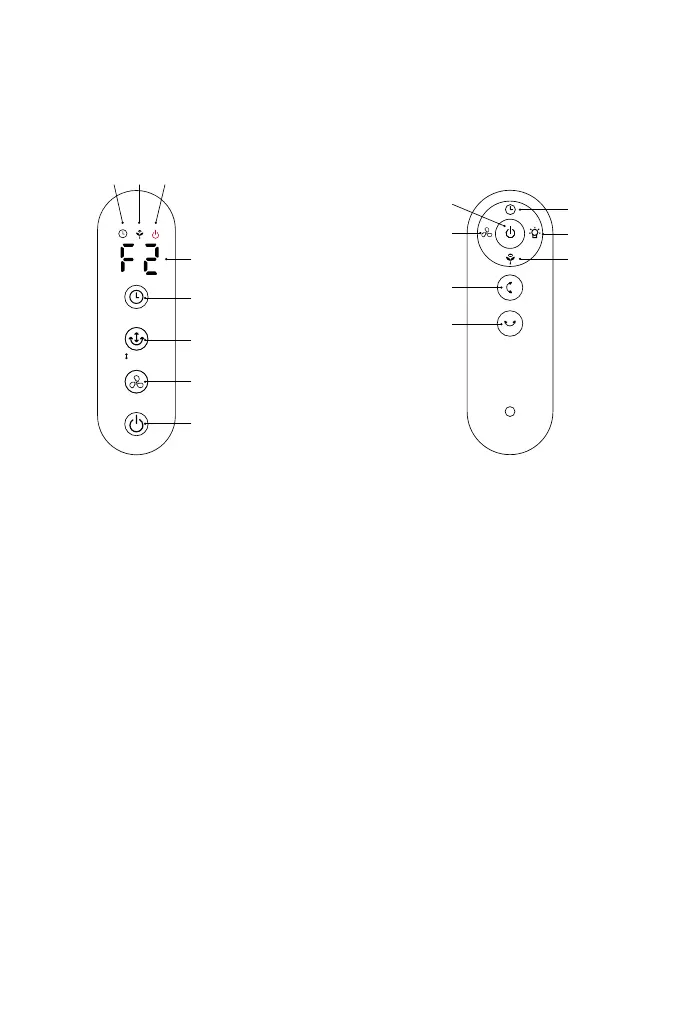
ON/OFF Button (A) (A1)
Press this button when the unit is o to turn it on.
Press this button when the unit is on, to turn it o.
SPEED Button (B) (B1)
Press this button when unit is on to select the desired speed from F1 to
12. The display will show the selected speed.
TIMER Button (C) (C1):
When the unit is operating, you can set the timer to switch the fan o
automatically after the set time. Press this button repeatedly to select
the desired time period in one hour increments from 1 hour to 12 hours.
The display will show the setted time in hours.
The indicator light H3 will turn on.
Control panel Remote control
Pushbuttons:
A. On/O
B. Speed
C. Timer
D. Swing-horizontal
E. Light
F. Ion
G. Swing-vertical
H1.H2.H3 indicator lights
Hold to turn
on ionizer
Hold to turn
on Light
Hold to turn
on Swing
A1
A
B1
B
C1
C
D1
G
D
H3
Display
E
F
H2 H1


 To Next Page