13/19
(EN) ASSEMBLING
(see images at the end of the manual)
(EN) USER INSTRUCTIONS
Place the fan on a flat, dry and stable surface, and insert the plug of the fan in a socket; the
unit will emit a short “BIP” sound indicating that power is supplied.
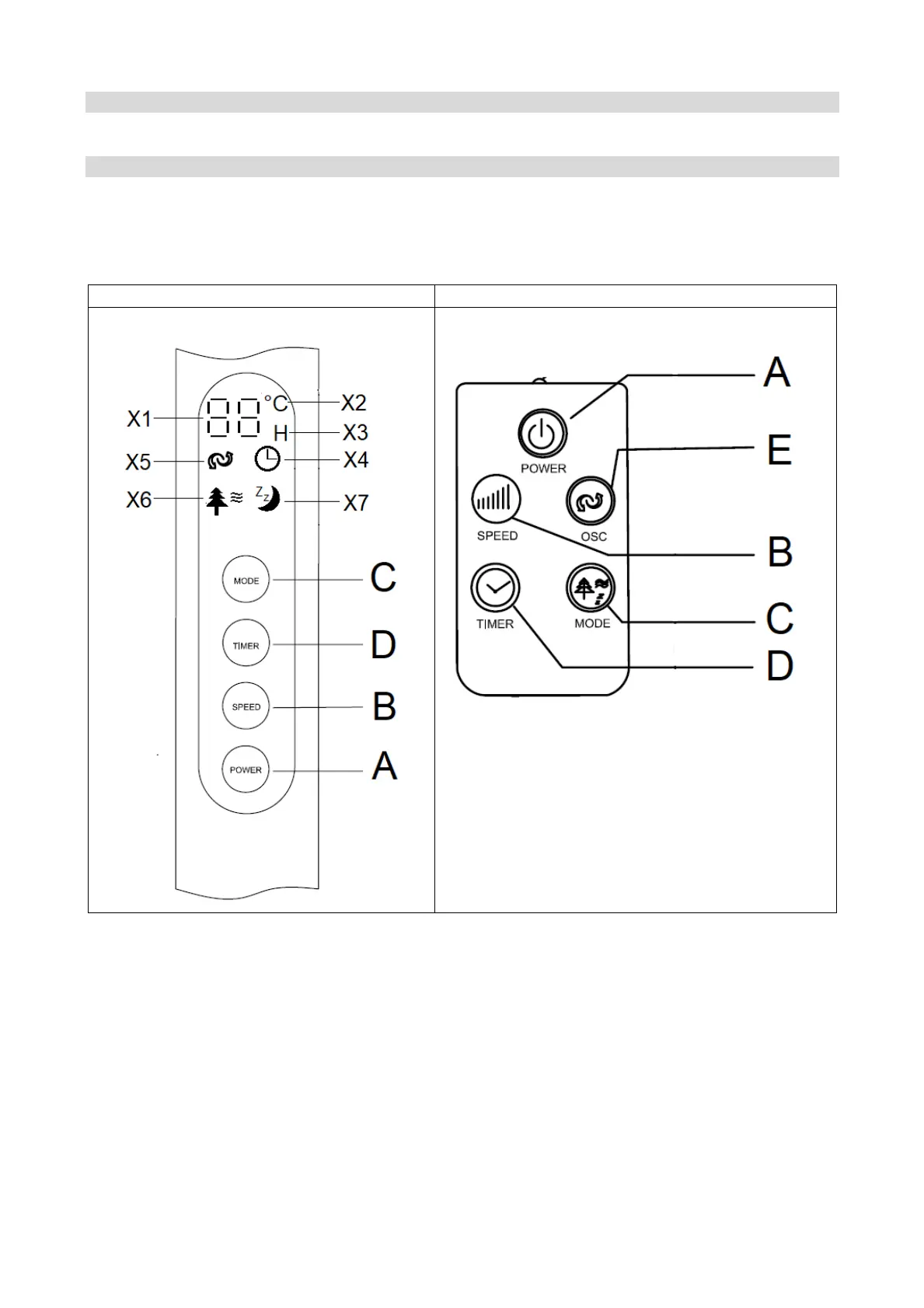
For your convenience the unit can be operated by using control panel in the main body or
using remote control included.
Control Panel Remote control
Buttons:
A. Power
B. Speed
C. Mode
D. Timer
E. OSC (remote control)
Indicator light:
X1. Display (Temperature / Timer / Speed)
X2. Indicator light of Temperature (°C)
X3. Indicator light of Time (hours)
X4. Indicator light of Timer mode
X5. Indicator light of OSC (swing)
X6. Indicator ligh of NATURAL mode
X7. Indicator light of SLEEPING mode


 To Next Page