22
Press the following buttons to select the function you need:
ON/SPEED
(button present both on the control panel and on the remote control):
press it to turn on the fan. While the fan is on, press it to select the speed
you need and select between Low (low speed), Med (average speed)
and High (maximum speed).
Each time you press the button to change the speed the related light
indicators will be turned on, on the display.
OFF
(button is present both on the control panel and on the remote control):
press it to turn off the fan. All the light indicators are off except for the
“Power” light indicator which shows that the fan is connected to the mains
supply.
MODE
(button present on the remote control):
while the fan is on, press it to select the operating mode you need, by
selecting between NOR (Normal), NAT (Natural) and SLEEP (Night).
NOR (Normal) - the fan operates according to the set speed
NAT (Natural) - the fan operates at an irregular speed between the
minimum and the maximum set speed, simulating the natural breeze.
SLEEP (Night) - the fan operates at an irregular speed as follows:
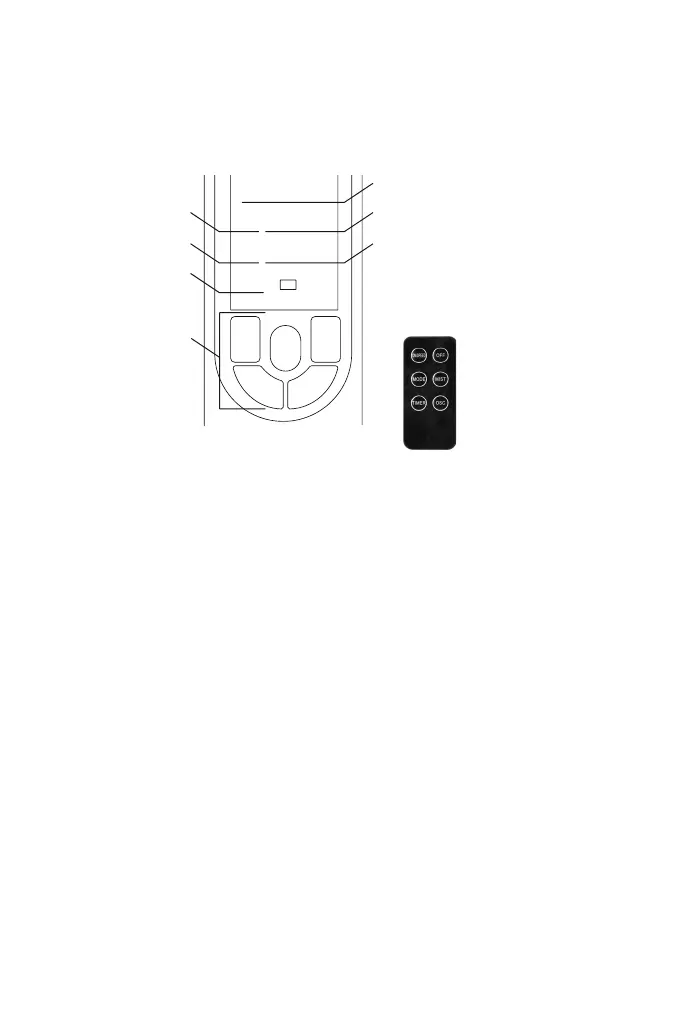
CONTROL PANEL AND DISPLAY LIGHTS
1H0,5H 2H 4H
OSC
MIST
OSC
OFF
MIST
TIMERON/SPEED
NORNAT SLEEP
POWER
LOWHIGHMED
Oscillation light
indicator: OSC
Misting light
indicator: MIST
Power light
indicator: POWER
TIMER light indicators:
0,5H - 1H - 2H - 4H
SPEED light indicators::
Low - Med – High
OPERATING MODE light
indicators:
Nor - Nat – Sleep
Control panel
Remote Control


 To Next Page