24
Maintenance
Before carrying out the regular cleaning operations turn off the fan and
unplug it.
DO NOT disassemble the fan: this fan cannot be disassembled.
For external cleaning use a soft and dry cloth.
DO NOT dip the device in water, or splash it with any other liquids.
DO NOT use solvents or any other chemical products for cleaning it.
When you do not use it, after cleaning it, store the fan in a dry place.
HUMIDIFIER
DAILY CLEANING
To reduce bacteria and scale residues, empty the water tank and the
water residues in the main body (20); rinse with clean water the tank
and the other parts in contact with water and dry them with a soft and
clean cloth.
WEEKLY CLEANING
Clean the water tank of the dehumidier at least once a week with a mild
activate the mist function. The indicator light placed on the control panel
of the humidier (21) turns on in green color.
You can adjust the intensity of the misting by rotating the adjustment
knob placed on the control panel of the humidier (21): if you rotate it
clockwise the intensity increases; if you rotate it counterclockwise the
misting intensity decreases.
The misting comes out of the knob in a few seconds after pressing the
button.
When the water is out, the misting function is disabled and the light
indicator of the adjustment knob turns red; we recommend you to disable
the misting function when the humidier is off or the tank is empty.
When the function is enabled the related light indicator is turned on, on
the display, and when the function is disabled the light indicator is turned
off on the display. The misting function can be enabled independently
from the ventilation; it is enough to turn off the fan by pressing the Off
button and then to press the Mist button.
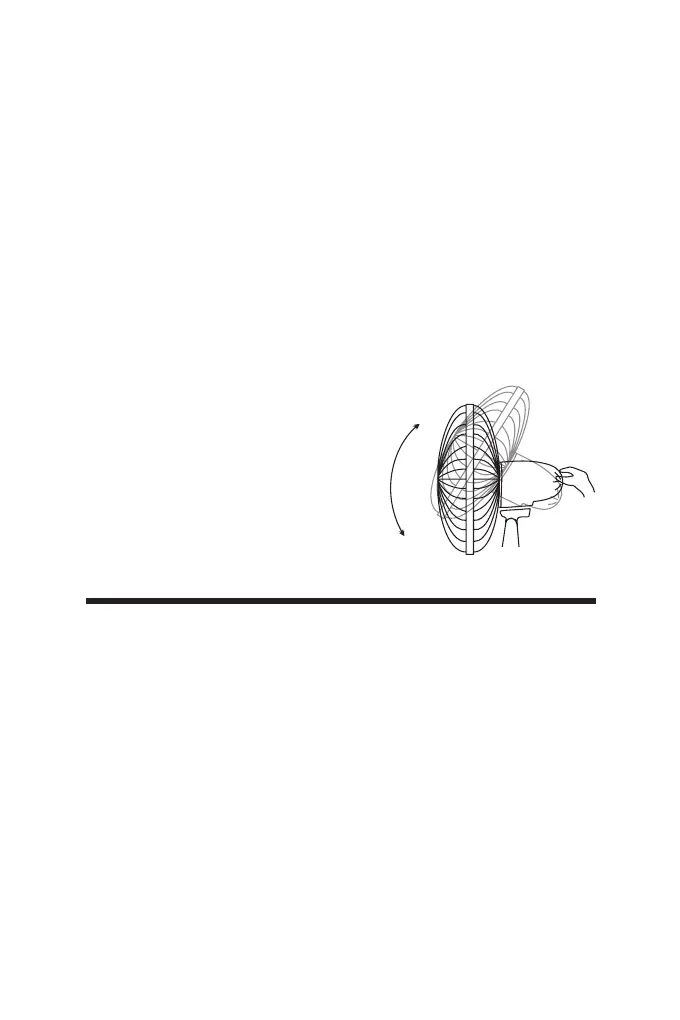
VERTICAL SLOPE:
You can vertically point the front of the fan
choosing the desired angle. It is sufcient
to move the front of the fan up or down
according to the desired slope.


 To Next Page