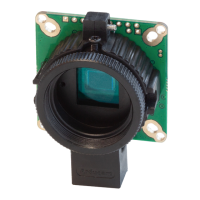
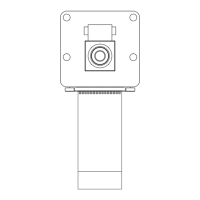
The Arducam Ultra Wide Angle Fisheye 5MP OV5647 Camera (SKU: B0428) is a specialized camera module designed for use with Raspberry Pi systems. This camera belongs to the V1 camera series, which utilizes the 5MP OV5647 sensor. Unlike the V2 cameras, which feature encrypted camera boards, the OV5647 series offers greater flexibility for modification and customization by third-party manufacturers, leading to a variety of available variations.
Function Description:
The primary function of this Arducam camera is to capture images and video, leveraging its ultra-wide-angle fisheye lens. It is specifically designed to integrate with Raspberry Pi boards, providing a visual input for various applications. The camera supports both still image capture and video recording at different resolutions and frame rates. Its wide field of view makes it suitable for applications requiring a broad perspective, such as surveillance, robotics, panoramic imaging, or experimental projects where a comprehensive view of the environment is beneficial. The camera's compatibility with both libcamera and raspistill tools on Raspberry Pi OS (Bullseye and Legacy) ensures a versatile software interface for users to control and utilize its capabilities.
Important Technical Specifications:
- Sensor: Omnivision OV5647 sensor
- Sensor Size: 1/4" (OV5647)
- Resolution: 5MP (2592x1944 pixels)
- Frame Rates:
- 1080p @ 30fps
- 720p @ 60fps
- 480p @ 90fps
- IR Sensitivity: Integral IR Cut Filter, visible light only. This means the camera is designed to capture visible light and filters out infrared light, which is typical for standard photographic applications where accurate color representation is desired.
- Field of View: 220° (Horizontal). This ultra-wide-angle fisheye lens provides an extremely broad perspective, capturing a significantly larger area than standard lenses.
- Effective Focal Length: 0.76mm
- 35mm Equivalent Focal Length: 8.2mm. This provides a reference for how the lens's field of view compares to lenses on a full-frame 35mm camera.
- Focus Type: Manual. Users must manually adjust the focus to achieve sharp images.
- Lens Mount: M12. This indicates the type of thread used to attach the lens to the camera module, suggesting potential for lens interchangeability if compatible M12 lenses are available.
- Dimension: 36mm x 36mm. This compact size makes it suitable for integration into various projects where space is a constraint.
- Peak Current: 300mA. This specifies the maximum electrical current the camera module may draw during operation.
Usage Features:
The Arducam Ultra Wide Angle Fisheye camera is designed for straightforward integration and use with Raspberry Pi.
-
Hardware Setup:
- Connection: The camera connects to the Raspberry Pi's Camera Serial Interface (CSI) port, located near the HDMI connector.
- Installation Process: The setup involves gently pulling up the plastic edge of the CSI connector, inserting the camera ribbon cable with the silver connector facing the Raspberry Pi MIPI port, ensuring the flex cable is not bent and is firmly inserted, and then pushing the plastic connector back down to secure the cable. This process is common for Raspberry Pi camera modules.
-
Software Setup:
- Operating System Compatibility: The camera is compatible with Raspberry Pi OS (Bullseye) and Raspberry Pi OS (Legacy).
- Libcamera Support (Raspberry Pi OS Bullseye): For newer Raspberry Pi OS versions (Bullseye), the camera can be accessed using the
libcamera command. Users need to ensure they have downloaded the official Bullseye OS.
- Raspberry Pi 4:
libcamera commands can be used directly.
- Raspberry Pi 0-3: Requires enabling "Glamor graphic acceleration" via
raspi-config before using libcamera commands. The steps involve running sudo raspi-config, navigating to "Advanced Options," enabling "Glamor graphic acceleration," saving, and rebooting.
- Raspistill Support (Raspberry Pi OS Bullseye and Legacy): The camera also supports
raspistill for image capture.
- Enabling Legacy Camera (Bullseye): On Bullseye, users must enable the "legacy camera" option through
raspi-config. This involves running sudo raspi-config, navigating to "Interface Options," enabling "Legacy Camera," saving, and rebooting.
- Detecting the Camera: After enabling, the camera can be detected using
vcgencmd get_camera. A successful detection will show supported=1 detected=1, libcamera interfaces=0.
- Capturing Images/Preview: Commands like
raspistill -t 0 (for preview) and raspistill -t -5000 -o test.jpg (for saving an image after a 5-second delay) are used.
- Raspberry Pi OS (Legacy): For older OS versions, enabling the camera is simpler: run
sudo raspi-config, select "Enable Camera," and reboot.
- Programming Libraries:
- Shell (Linux command line): Documentation is available on the Raspberry Pi website for general camera usage.
- Python: Python libraries for camera control are also available, specifically
picamera, with documentation provided on the Raspberry Pi projects website.
- Documentation: Arducam provides a dedicated guide for
libcamera usage with Raspberry Pi cameras, accessible via a provided URL, offering more detailed commands and instructions.
Maintenance Features:
The manual does not explicitly detail maintenance features in a dedicated section. However, based on the nature of the device and general best practices for camera modules:
- Physical Handling: The instruction to "Do not bend the flex cable" during installation highlights the importance of careful physical handling to prevent damage to the delicate ribbon cable, which is crucial for the camera's functionality.
- Environmental Protection: While not stated, it is generally advisable to protect the camera module from dust, moisture, and extreme temperatures to ensure longevity and optimal performance. The exposed lens and PCB components are susceptible to environmental factors.
- Manual Focus: The "Manual" focus type implies that users will need to periodically adjust the lens to maintain sharp focus, especially if the camera's position or the distance to the subject changes. This is a user-driven maintenance task rather than an automated one.
- Software Updates: Keeping the Raspberry Pi OS and associated camera software (like
libcamera or raspistill) updated is a form of maintenance that ensures compatibility, performance improvements, and security patches.
- Cleaning: Although not mentioned, gentle cleaning of the lens with a microfiber cloth designed for optics would be necessary if dust or smudges accumulate, to maintain image quality.
- Troubleshooting: The
vcgencmd get_camera command serves as a basic diagnostic tool to confirm if the camera is detected by the Raspberry Pi, which is a fundamental step in troubleshooting any camera-related issues.
In summary, the Arducam Ultra Wide Angle Fisheye 5MP OV5647 Camera is a robust and flexible imaging solution for Raspberry Pi users, offering a wide field of view and extensive software compatibility, making it suitable for a broad range of DIY and professional projects. Its manual focus and open-source friendly nature provide users with significant control and customization options.

 Need help?
 General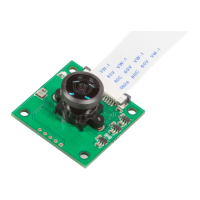

 To Next Page