12
TOSTEAM(CONT.)
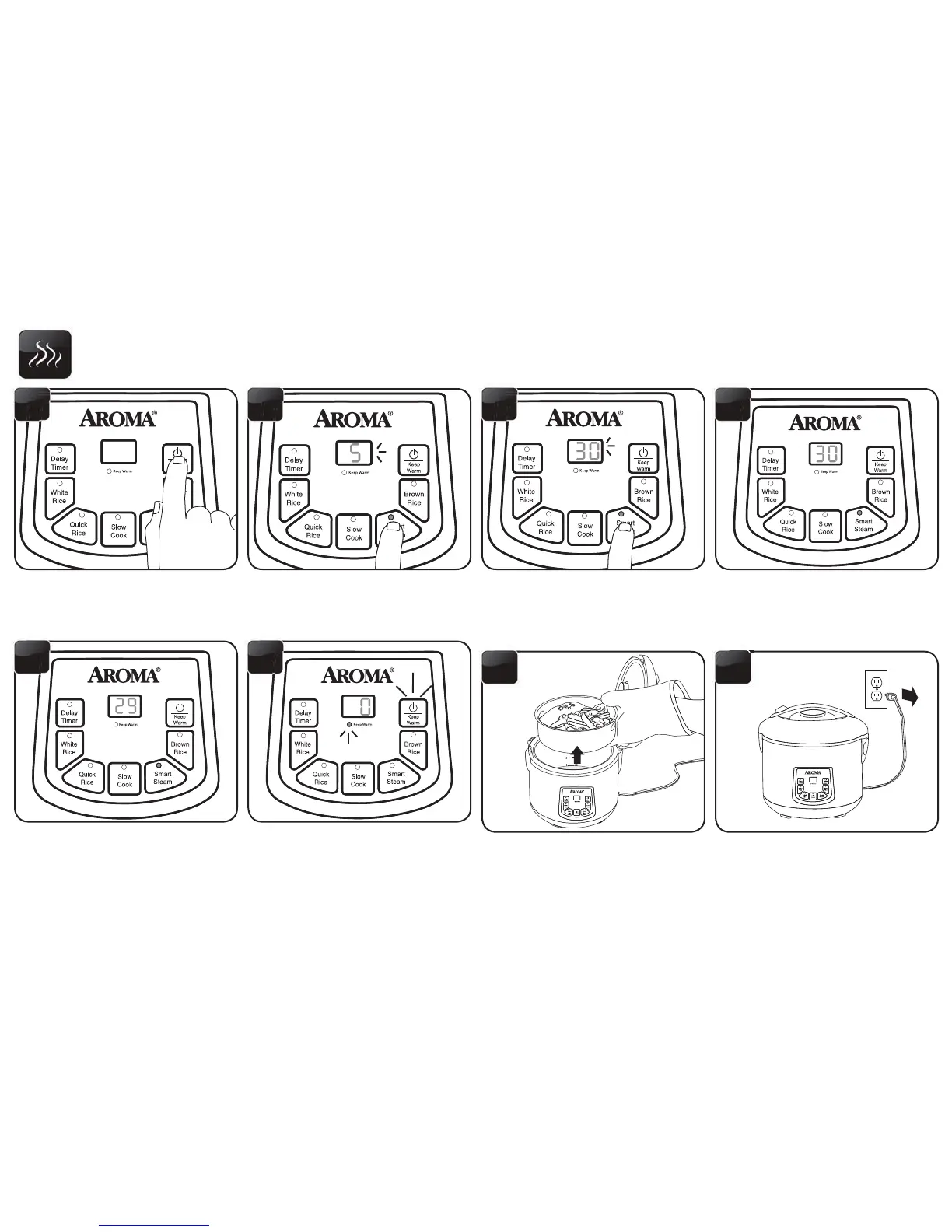
Each press of the STEAM button will
increase steaming time by one minute,
up to 30 minutes. After 30 minutes, it
willcyclebacktoveminutes.
7
Once cooking time is selected, the
rice cooker will beep and the digital
displaywillstopashingtoindicate
it is setting to the displayed time and
steaming has begun.
8
When the water reaches a boil, the
digital display will count down in
one minute increments from the
selected time.
9
Once the selected time has passed,
the rice cooker will beep and switch
to its “Keep Warm” setting. The
digital display will show the number
of hours the rice cooker has been on
“Keep Warm,” beginning with “0.”
10
Check steamed food for doneness.
Ifnishedsteaming,carefully
remove the steam tray. It will be
hot.
11
Press the POWER button twice to
turnothericecookerandunplug
the power cord.
12
Press the POWER button to turn the
rice cooker on.
5
Press the STEAM button. The digital
displaywillshowaashing5to
representveminutesofsteamtime.
6


 To Next Page