8
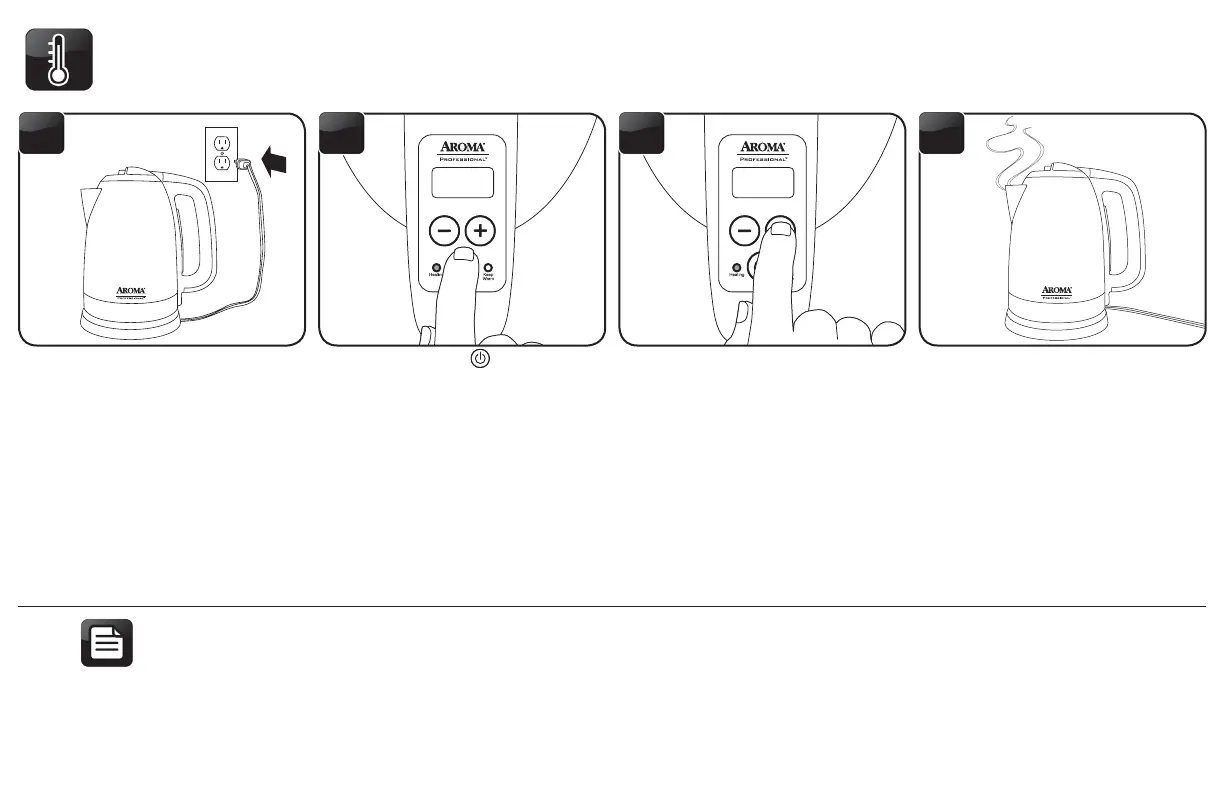
Press the POWER ( ) button to
turn the kettle on. The Heating
Indicator will illuminate, the Digital
Display will display “160” and
the kettle will begin heating the
water. As the water begins to heat,
the Digital Display will show the
temperature in real time.
7 8
65
USING THE KEEP WARM TEMPERATURES (CONT.)
Pressing the + or – buttons
will increase or decrease the
temperature in 10 degree intervals
between 120 and 200 degrees.
Once the desired temperature
setting is reached, the kettle will
beep 3 times and stop heating.
The kettle will heat occasionally
in order to maintain the selected
temperature.
Plug the Power Cord into a wall
outlet and place the kettle onto the
Power Base. The kettle will “beep”
once to indicate it is on.
• Do not use abrasive cleaners or scouring pads.
• Do not immerse the kettle body or power base in water at any time.
NOTE


 To Next Page