Need help?
Do you have a question about the Aroma TDX-25 II and is the answer not in the manual?
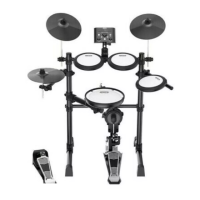
Play TDX-25 II with amp or headphones for acoustic drum feel, with adjustable volume.
Features 43 accompaniment styles, metronome, adjustable volumes, and 20 upgraded drum kit sounds.
New mesh heads for tom and snare offer better response and reduced noise.
Includes 10 metronome tones, adjustable tempo, beat, rhythm, and volume with light indication.
User-friendly design with 4 function buttons, control knob, and LCD display for easy operation.
Simple assembly in eight steps with a detailed color installation guide for convenient setup.
CR1, CR2: 11-inch, silicone/plastic, mute function, positioned left top.
RD: 11-inch, silicone/plastic, mute function.
HH: 10-inch, silicone/plastic, single trigger.
T1, T2, T3: 7-inch mesh heads, patented technology for better response and less noise.
SD: 8-inch mesh head, dual trigger, velocity-sensitive, side-stick capable.
BD: 10-inch, aluminum alloy pedal, sensitive to striking force for varied sounds.
HHP: Aluminum alloy pedal, works with Hi-Hat for different sound expressions.
Learn to play the Hi-Hat using the pedal for open, closed, and varied sounds.
Explore playing the Crash Cymbal with bow and edge shots for different sounds and muting.
Discover playing the Ride Cymbal with bow, edge, and bell shots for varied sonic textures.
Understand how striking force and speed on the Bass Drum pedal produce different sound effects.
Learn to play the Snare Drum for varied sounds based on stick strength and head impact.
Details the Volume Faders, Switch Knob, Confirm Button, and function buttons like COACH, METRO, SETUP, QUICK.
Explains the Bluetooth, Output, AUX, Headphone, USB, and DC9V power ports on the host machine.
Connects the host machine's OUTPUT to an amp/headphone and the power adapter to DC9V.
Instructions on how to power on by pressing the button and power off by long-pressing it.
Guides on turning on the drum amp and adjusting volume levels for balance.
Explains how to use the switch knob to select from various drum kits like Pop Stage.
Describes selecting songs using the COACH button and switch knob for practice.
Guide to editing kit parameters like Pitch, Level, Pan, Reverb, Velocity, Sensitivity, and Voice.
Details how to access and adjust system settings like Trig Scan, EQ, Reverb, and Local mode.
Instructions on restoring the current drum kit's settings to factory defaults using the KIT RESET option.
Explains how to set the automatic shutdown timer for the host machine.
Guides on resetting all drum kit settings to their original factory defaults.
Details how to adjust crosstalk parameters to resolve issues with unintended trigger sounds.
Sensitivity adjustment for pads/cymbals. Lower value means higher sensitivity.
Velocity curve adjustment for strike force and habit. Options range from LINER to LOUD2.
Reverb effect level for pads/cymbals. Higher value means greater reverb.
Sound image adjustment to position sounds in the stereo field.
Pad or cymbal volume level adjustment.
Pad or cymbal sound selection for specific sounds.
MIDI mapping value, default is general MIDI mapping (JMSC 1991).
Prevents double triggers by setting mask time. Adjust as small as possible.
Monitoring time between triggers. Bigger value means longer time; set as small as possible.
MIDI signal channel, defaulted to channel 10.
Local sound output control. On by default, outputs sound with MIDI signal.
Reverb effect type selection (room1, room2, hall, studio, stage).
Reverb effect volume level adjustment.
Volume level adjustment for high frequencies.
Volume level adjustment for low frequencies.
Resets the current drum kit sound to factory default settings.
Automatic shutdown time length (30 mins or 1 hour) at standby.
Resets all settings to factory defaults. Use with caution.
Crosstalk parameter adjustment to solve cross-triggering issues.
Adjust the metronome tempo between 40-240 BPM using the switch knob.
Select different rhythmic patterns like 1/4, 1/8, 1/16, and Trip variations.
Choose the beat count from 1 to 8 for the metronome.
Select the metronome sound from a range of 1 to 100.
Steps to calibrate the Hi-Hat pedal's sensitivity due to environmental factors.
Guide to connecting the TDX-25 II to a phone via Bluetooth, including IOS code and volume tips.
Details MIDI functions, transmitted signals, and recognized remarks for communication with external devices.
Lists all components included: crash, hi-hat, ride, toms, snare, hi-hat pedal, bass drum pedal.
Specifies the number of drum sound kits available, which is 20.
Details metronome parameters: Tempo (40-240 BPM) and Beat (1-8).
Lists all control buttons: Power, Confirm, SETUP, QUICK, COACH, METRO, Bluetooth, Knobs.
Details all external interfaces: Audio out, headphone, AUX in, USB MIDI, DB25, and power adapter.
States the power requirements: DC9V voltage and 300mA current.
Lists included accessories and optional items like drum amps and rugs.
Troubleshooting steps for no sound or low volume issues, checking connections and volume levels.
Solutions for unresponsive or overly sensitive hi-hat/bass drum pedals, checking connections and sensitivity.
Addresses cross talk issues by checking assembly, DB25 cables, and using calibration tools.
Steps to resolve USB connection failures, ensuring power and correct adapter usage.
Troubleshooting for power-on failures, unresponsive power buttons, or abnormal screen display.
 General
| Coach | Yes |
|---|---|
| Metronome | Yes |
| Display | LCD |
| Kick | Kick Pad |
| Kits | 10 |
| Connectors | USB |
| Pads | 8 |

 To Next Page