Need help?
Do you have a question about the ARROWMAX SEs and is the answer not in the manual?
This document provides a manual for the SES Electric Screwdriver Set 96+6, also branded as ARROWMAX.
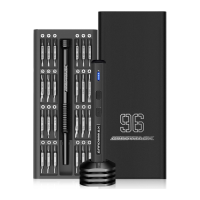
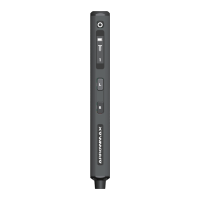
The SES electric screwdriver is a precision tool designed for loosening and tightening screws. It features an OLED digital dynamic display that shows torque adjustment, forward and reverse key status, current remaining power, and charging status. The screwdriver is equipped with four LED lights on the head that automatically illuminate during operation. Its handle has a unique square shape with a circular arc surface, designed for improved grip and comfort during use, breaking from traditional precision electric screwdriver designs.
The device is part of a precision screwdriver set that includes 96 different types of bits, making it suitable for a wide range of applications such as 3C products, computers, four-axis unmanned machines, glasses, clocks, toys, and models, allowing for both installation and disassembly.
During operation, the OLED screen displays an animation indicating whether the screwdriver is locking or loosening screws, along with the direction of bit rotation. The arrow on the display dynamically shows the direction of rotation of the screwdriver head. When the L-reverse key is pressed and held, the arrow dynamically displays to the left, and the screwdriver head rotates left to loosen the screw, with a screw mark moving upwards. Conversely, pressing and holding the R-forward key makes the arrow display to the right, and the screwdriver head rotates right to tighten the screw, with a screw mark moving downwards.
The motor is protected against overload, and the screwdriver also offers a manual mode. A specially formulated high-capacity lithium battery is used to maximize the internal space of the product. The design aims to maintain torque and power while reducing the size of the SES by over 20% compared to similar products, and the 500mAh lithium battery capacity ensures longer working times.
Product List: The set includes:
Gear Setting: To adjust the torque, press the torque adjustment button three times in a row to enter the gear setting interface. A single press then allows you to select the desired working gear. After selection, release the button and wait for 2 seconds. The data will be saved, and the device will automatically return to the standby interface. The status display shows the current battery status (e.g., 100% Battery), charging status (dynamic icon), and the current gear display (Gear 1, with four gears total: 1234).
Bit Installation: Bits are installed into the Bit Installation Port at the bottom of the screwdriver. To use a bit, take it out from its slot in the storage box and insert it into the port. The bits are held in the inner box by magnetic absorption.
Working Status:
Storage Instructions: The precision screwdriver set comes in a storage box with an inner box.
Precision Screwdriver Storage:
Warranty Information:
Maintenance Information (User to fill in):
Manufacturer Information:
 General
| Brand | ARROWMAX |
|---|---|
| Model | SEs |
| Category | Power Tool |
| Language | English |

 To Next Page