Scan the QR Code with your phone to watch the video tutorial instructions
9
MODULE 120
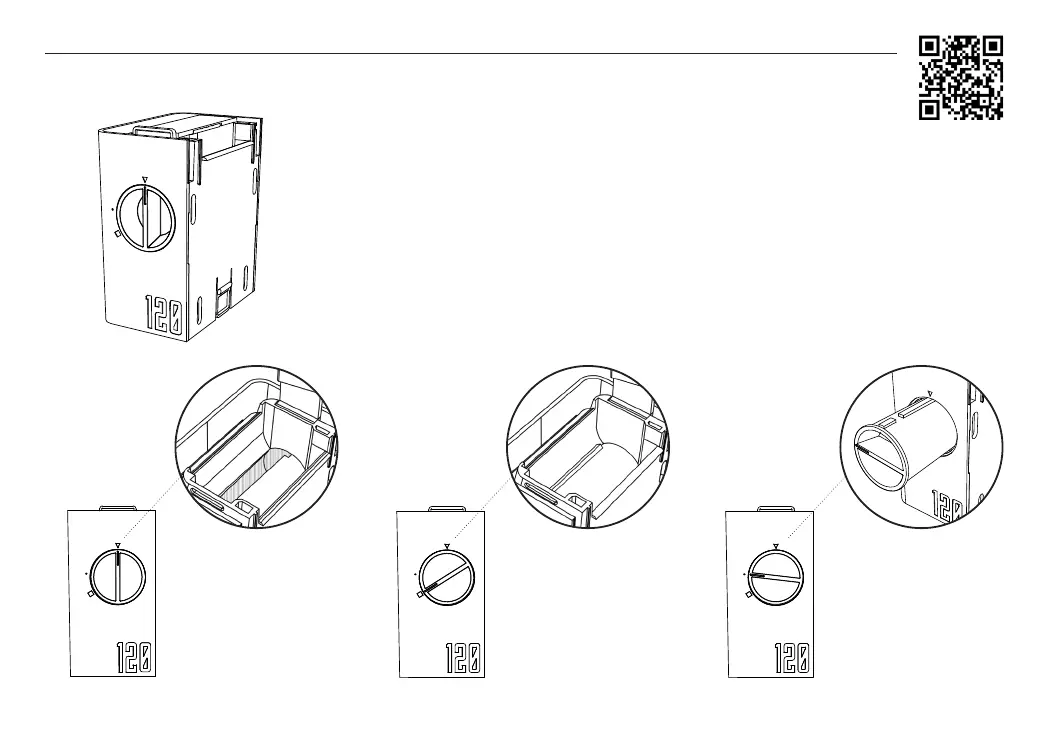
The 120 module turns Lab-Box into a developing tank for 120 lms. The module has a lm
chamber inside and a split on the outside to extract the black backing paper while the lm
is wrapped inside. The gray lm block is used to press the 120 lm roll against the lm cham-
ber and ensure that the lm is wrapped correctly.
The external knob allows you to open (triangle position) or close (square position) the lm cham-
ber. Placing the knob at the point allows you to extract the piece. It is important that the lm cham-
ber be completely dry before using the module, otherwise the lm loading can be compromised.
| Contents - MODULE 120 |
TRIANGLE POSITION
Film chamber open to
load the lm
SQUARE POSITION
Film chamber closed to
clip the lm before loading
POINT POSITION
Film chamber removal
VIDEO - 3


 To Next Page
 Loading...