Everlea Group Limited
Everlea Group LimitedEverlea Group Limited
Everlea Group Limited
www.everlea.co.nz
www.everlea.co.nzwww.everlea.co.nz
www.everlea.co.nz
2
22
2.
..
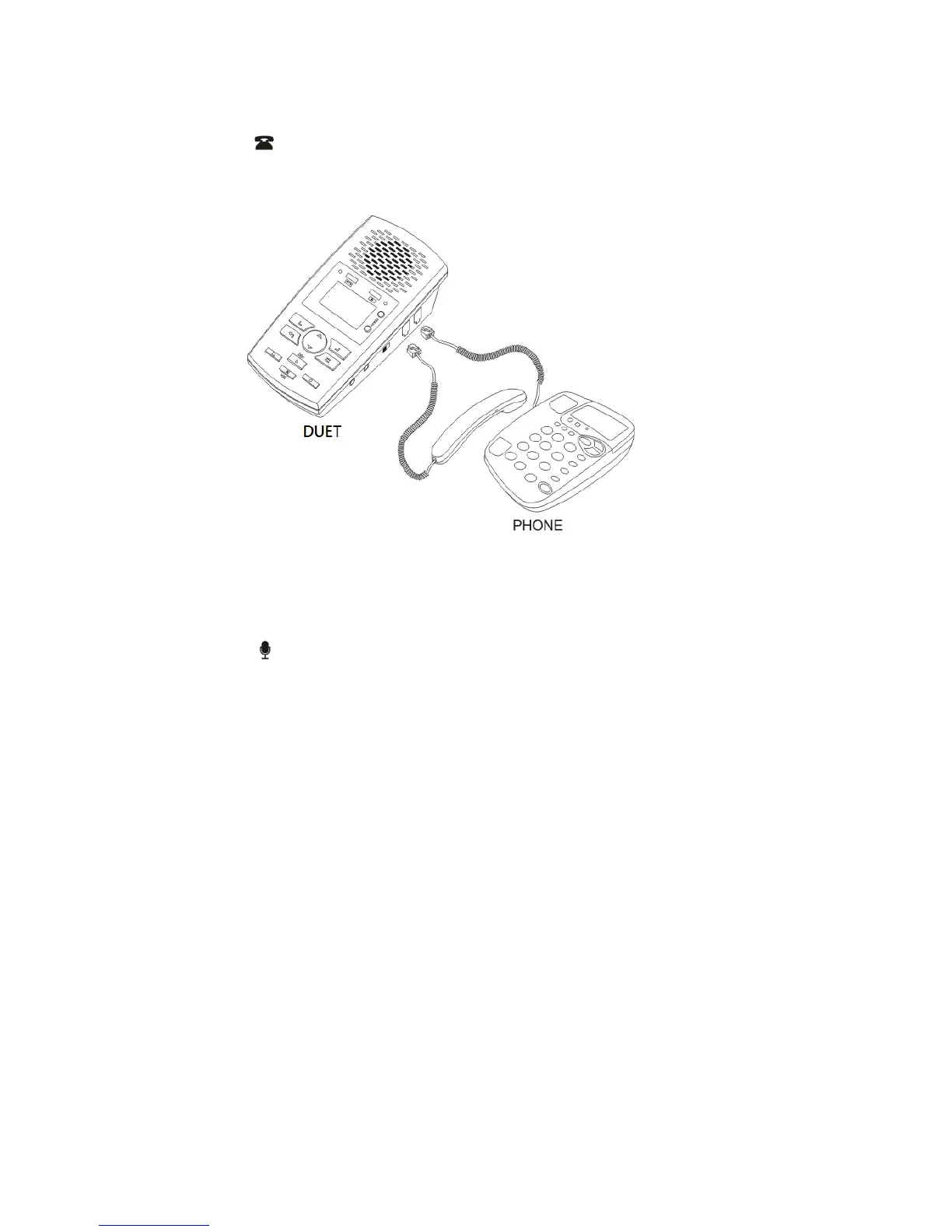
.Digital phone Connection (Handset)
Digital phone Connection (Handset)Digital phone Connection (Handset)
Digital phone Connection (Handset):
::
:
a. Switch SOURCE to PHONE
b. Connect handset line to LINE
c. Connect handset to PHONE
** will be shown on the LCD. Voice trigger setup is necessary. See
Page 9 for set up.
3
33
3.
..
.Microphone connection
Microphone connection Microphone connection
Microphone connection (
((
(E
EE
En
nn
nviro
viroviro
viron
nn
nmental Record
mental Recordmental Record
mental Record)
))
):
::
:
a. Switch SOURCE to MICDUET
** will be shown on LCD. See Page 8 for set up.
Remark
RemarkRemark
Remark:
::
:See Page 11 for initial Time/Date set up.
See Page 11 for initial Time/Date set up. See Page 11 for initial Time/Date set up.
See Page 11 for initial Time/Date set up.


 To Next Page