artemis
сomponents manual
Gimbal
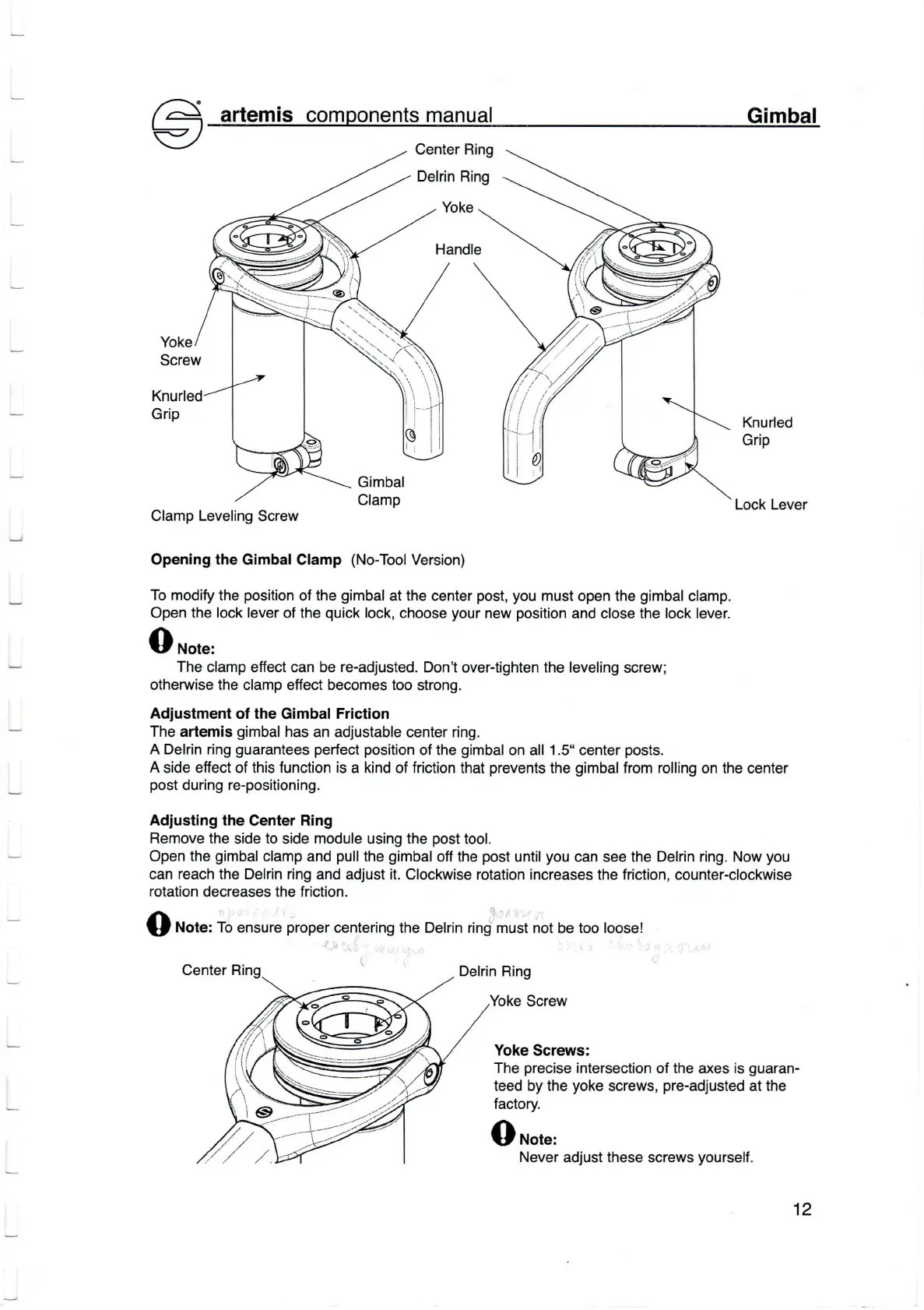
Center Ring
Knurled
Grip
Loсk Lever
Opening the Gimbal
Clamp
(No-Tool
Version)
To
modify
the
position
of
the
gimbal
at the сenter
post,
you
must
open the
gimbaI
c|amp.
open
the loсk lever
of the
quiсk
loсk, сhoose
your
new
position
and с|ose the |oсk lever.
O
*o,",
Тhe
сlamp effeсt can be
re-adjusted.
Don't
over-tighten the
leve|ing
sсrew;
otherwise the с|amp effect becomes
too strong.
Adjustment of the
Gimba!
Friction
Тhe
artemis
gimba|
has an adjustable
сenter ring.
A Delrin ring
guarantees
perfeоt
position
of the
gimbal
on
a||
1.5.. сenter
posts.
A
side effeоt of this funсtion is a kind of friсtion
that
prevents
the
gimba|
from
rol|ing
on the сenter
post
during re-positioning.
Adjusting the
Center
Ring
Remove the
side
to
side
module
using the
post
tool.
open
the
gimbal
с|amp and
pu||the
gimbal
off the
post
untilyou сan
see
the Delrin ring. Now
you
сan reaсh the De|rin ring
and adjust it. C|oсkwise
rotation increases the friсtion, counter-с|oсkwise
rotation deсreases the friсtion.
Q
шo.".
Тo ensure
proper
сentering
the
De|rin
ring must not
be
too |oose!
Center Ring
Delrin Ring
Yoke
Sсrew
Yoke
Sсrews:
The
preсise
interseсtion of the
axes
is
guaran.
teed
by the
yoke
sсrews,
pre-adjusted
at the
faсtory'
O
*o,",
Yoke
C|amp Leve|ing
Sсrew
r4-z
Never adjust these sсrews
yourself'
12


 To Next Page
 Loading...