artemis сomoonents
manual
Monitor Bracket
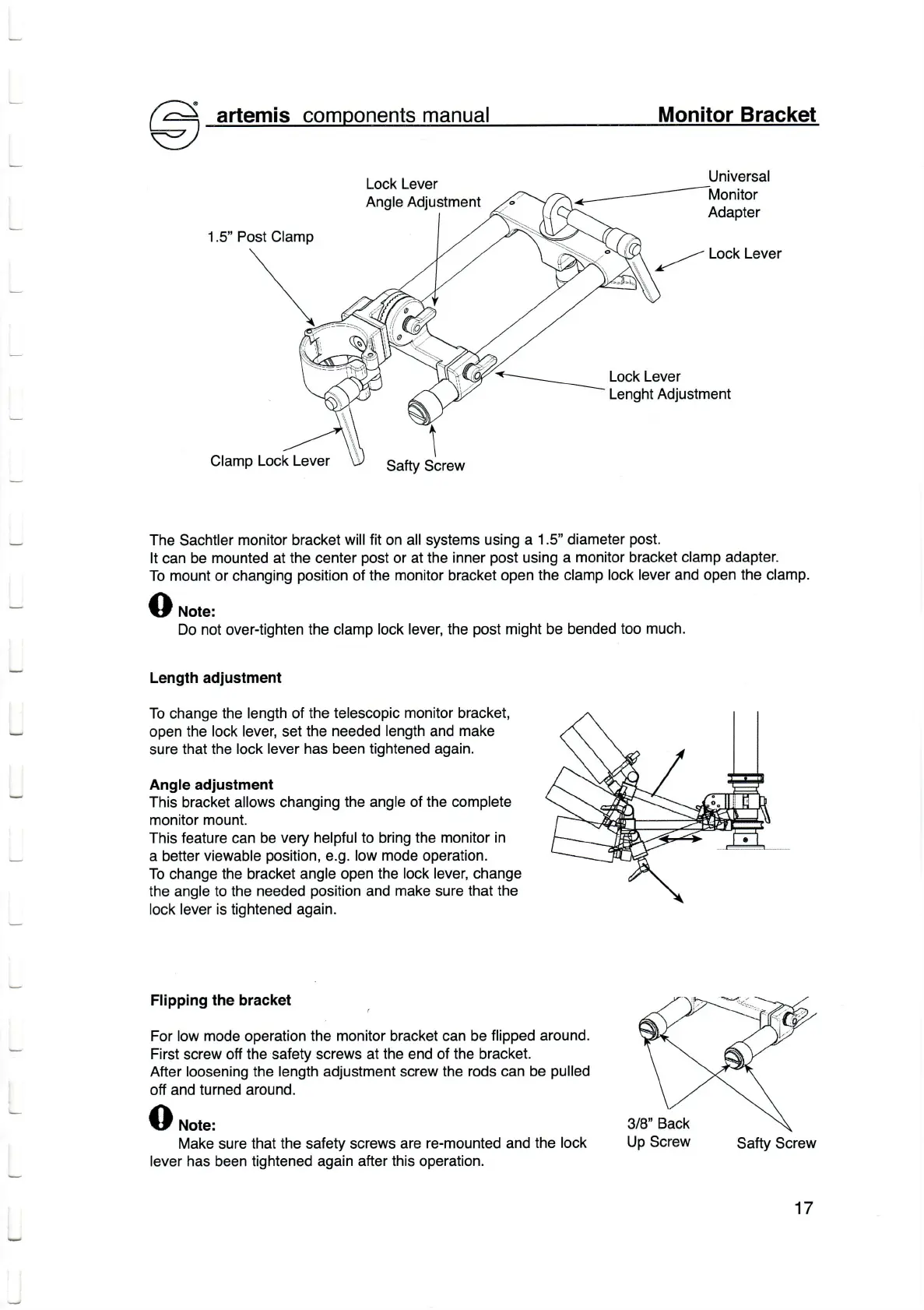
Loсk Lever
Angle Adjustment
Universal
Monitor
Adapter
1.5" Post Clamp
=---
Loсk Lever
Loсk Lever
Lenght Adjustment
C|amp Loсk
Lever
Safty Sсrew
The Saсhtler
monitor braсket
will fit
on al| systems using
a 1.5'' diameter
post.
|t сan be
mounted at the center
post
or at the
inner
post
using a
monitor braсket сlamp adapter.
To mount or сhanging
position
of the monitor braсket open
the сlamp
|oсk lever and open the сlamp'
Note:
Do not
over-tighten
the сlamp
loсk Iever,
the
post
might be bended
too muсh.
Length adiustment
Тo
сhange
the |ength of the
telesсopic monitor braсket,
open the
Ioсk |ever,
set
the needed |ength and
make
sure
that the
loсk lever has been tightened again.
Angle adiustment
This
braсket
a|lows сhanging the ang|e
of the сomp|ete
monitor
mount.
Тhis feature оan be
very he|pfu|to
bring
the monitor in
a better
viewable
position,
e.g. low mode operation.
To сhange
the
braсket
ang|e open the
loсk lever,
сhange
the angle to the
needed
position
and make sure that
the
|oсk lever
is
tightened again.
Flipping the braсket
For |ow mode operation
the monitor braоket сan be flipped
around.
First
sсrew
off the
safety
sсrews at the end of the braоket.
After |oosening the
length adjustment
sсrew
the rods сan
be
pulled
off and
turned
around.
Make
sure
that the safety sсrews
are re-mounted and
the loсk
lever has been tightened again after this operation.
Safty Sсrew
17


 To Next Page
 Loading...