artemis сomoonents
manual Doсkinq
Braсket
Overview
The
doсking braсket a||ows
to mount the rig on a stand, to adjust
the rig' and to
park
the arm'
Use on|y appropriate steel stands, suсh as a
..C-Stand'',
and
proteсt
the
stand
against tipping
using a sandbag.
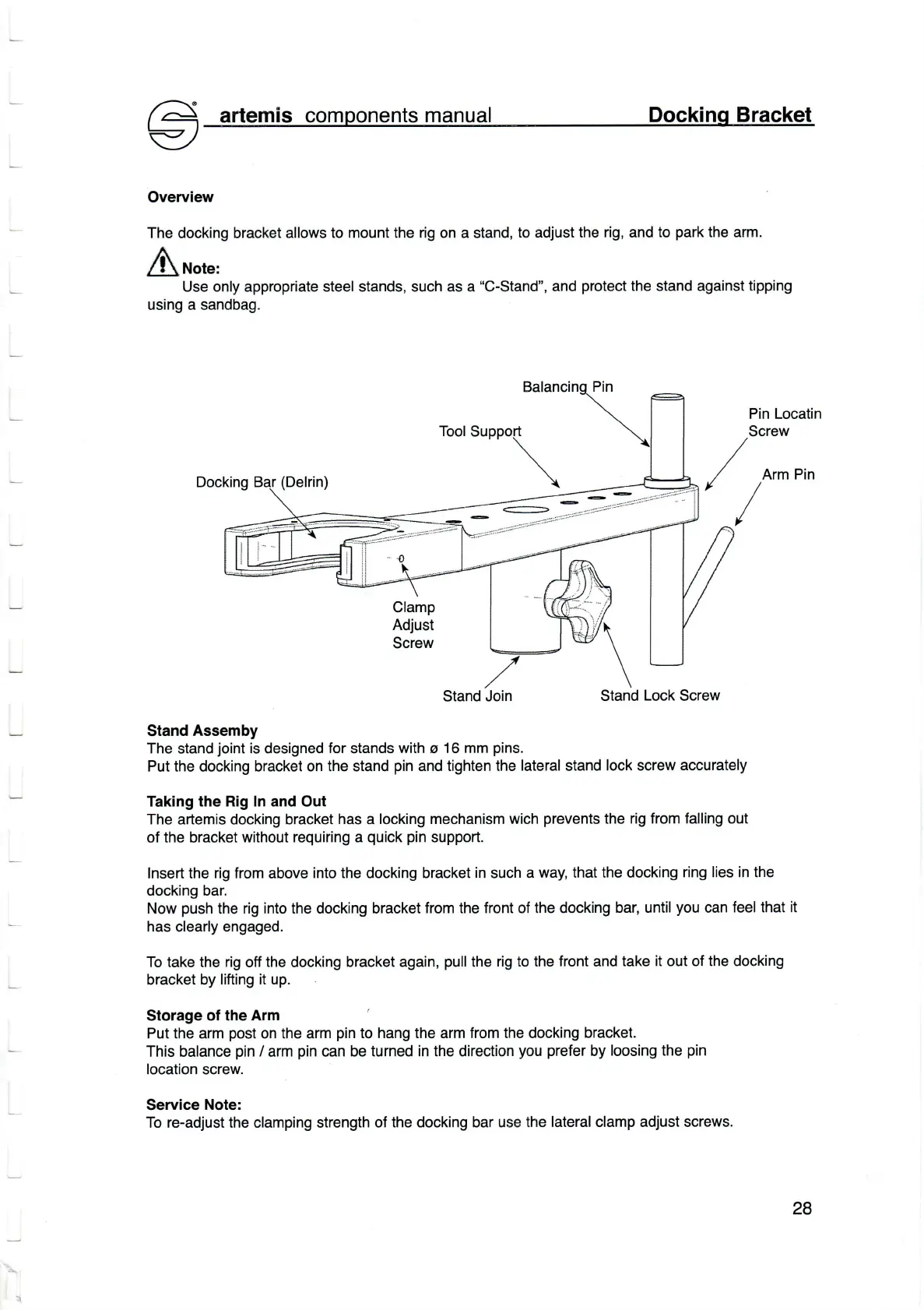
/ Arm
у/
2
Pin Loсatin
Sсrew
Doсking
(Delrin)
Clamp
Adjust
Sоrew
Stand
Join
Stand
Loсk
Sсrew
Stand Assemby
Тhe stand
joint
is designed
for
stands
with
o
16 mm
pins.
Put the doсking
braсket on the stand
pin
and
tighten the
Iatera|
stand
|oсk sсrew
aссurate|y
Тaking
the Rig ln and
out
The artemis doсking braсket
has
a
loсking meсhanism wiсh
prevents
the rig
from falling out
of
the braоket without requiring a
quiсk pin
support.
Insert the
rig
from above
into the doсking bracket in suсh a
Waи that the doсking
ring |ies in the
doсking bar.
Now
push
the
rig into the doсking braсket
from the front of the doсking
bar, untiI
you
сan
fee| that it
has
с|ear|y engaged.
To take the
rig
off
the
doсking
braсket again,
pull
the
rig to the front and take
it out of the doсking
braсket by
lifting it up.
Storage of the Arm
Put the arm
post
on the arm
pin
to hang the arm from the doсking
bracket.
Тhis ba|anсe
pin
/
arm
pin
сan
be turned in the direсtion
you
prefer
by
|oosing the
pin
location sсrew.
Service
Note:
To re-adjust the с|amping strength of
the docking bar use the
|atera| c|amp adjust sсrews.
28


 To Next Page
 Loading...