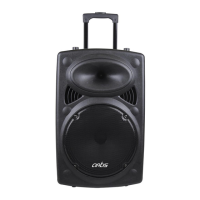
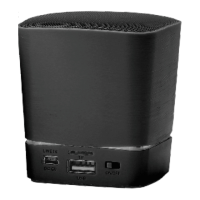
• Digital karaoke, treble and bass independent adjustment
• Built-in MP3 encoding supporting U disk
• Unique acoustic appearance design
• Professional treble and bass gain controlling circuit
• Built-in battery for outdoor activities
• Built-in professional wireless microphone system
• Professional high-effective loud-speaking unit
• Compatible to DVD | VCD | PC and other sound sources
• Suitable for adaptor and charging
• Intelligent power switch charging circuit
FEATURES
• Connect the supplied cable to 110V-120V jack (2pin adapter included) to charge the built in battery.
• Please make sure battery is fully charged prior to initial use. For best results (or to charge faster) do not use the
unit while charging.
• Use On | Off button to switch power ON | OFF on unit.
POWER SUPPLY FOR UNIT
• Short press “M” (Mode) button to switch between BT | USB | SD | FM | AUX
• On your smartphone, scan and select “BT Speaker ” to pair.
• Sound will depend on quality of your media file or distance of smartphone from speaker ( Distance should
NOT be more than 30Feet) or There should be no object blocking the Wireless Signal
• To change tracks Short Press (Previous Track) or (Next Track).
• To Pause or Release Pause Short Press “PL | PA”
BLUETOOTH MODE
• Plug in your USB Disk or TF Card in the slots provided. Please make sure you use the correct file format in your
media devices – MP3 FILES ONLY and correct mode has been selected.
• Short press “M” (Mode) button to switch between BT | USB | SD | FM | AUX. Please ensure that your speaker is fully
charged& that your files are MP3 format, and the correct source has been selected.
• To change tracks Short Press (Previous Track) or (Next Track).
• To Pause or Release Pause Short Press “PL | PA”
• Please remember to turn off the power of the Speaker before removing the USB Disk or SD Card.
USB / TF
• Short press “M” (Mode) button to switch between WIRELESS | USB | SD | FM | AUX. Please ensure that your
speaker is fully charged & correct source has been selected.
FM RADIO
• Plug in external device to Aux jack using supplied cable to listen audio through unit.
• Short press “M” (Mode) button to switch between BT | USB | SD | FM | AUX. Please ensure that your speaker is fully
charged & correct source has been selected
• Short Press “▶||” to mute
• Tracks can only be changed from your connected external device.
AUX (LINE IN )


 To Next Page
 Loading...