www.asiarf.com
TEL: +886 2 29407880
Copyright © AsiaRF . All rights reserved. While every effort is made to ensure the information is accurate, AsiaRF does not accept
liability for any errors or mistakes that may arise. All specifications are subject to change without notice.
AsisRF Co., Ltd. | www.asiarf.com | (+886) 2 8943 1001 | sales@asiarf.com | Last Updated: 27/07/2023
P.18
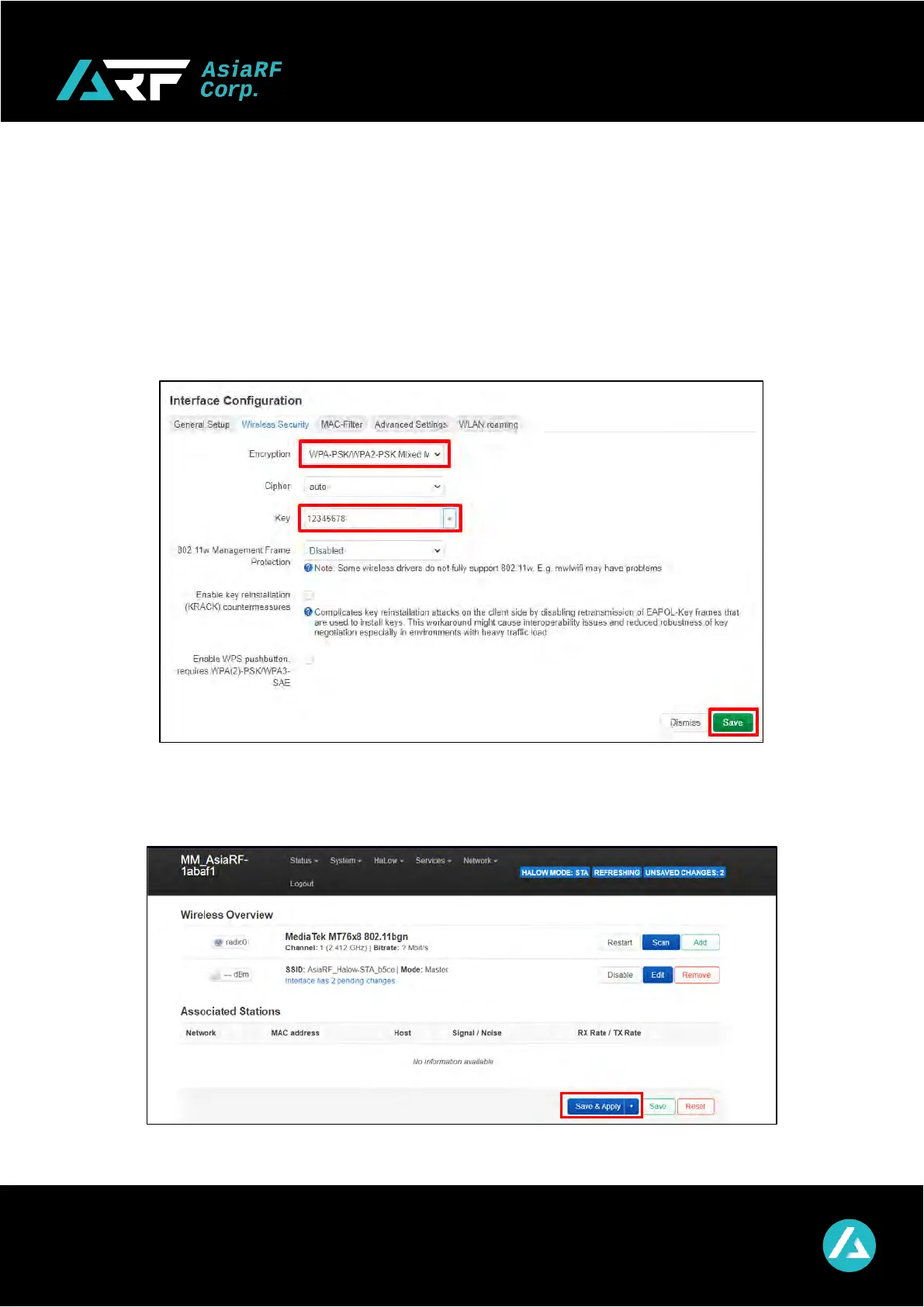
*** If you don’t need to set the Wi-Fi password. ***
*** You can press the “Save” button to skip the next step. ***
Click “Wireless Security” and choose one of the encryption types.
Ex. “WPA-PSK/WPA2-PSK Mixed Mode (medium security)”
Input your Wi-Fi password in “Key” field and don’t forget it.
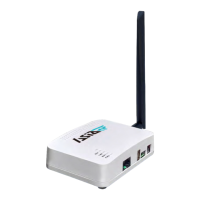
Click the “Save & Apply” button to save the configuration.


 To Next Page