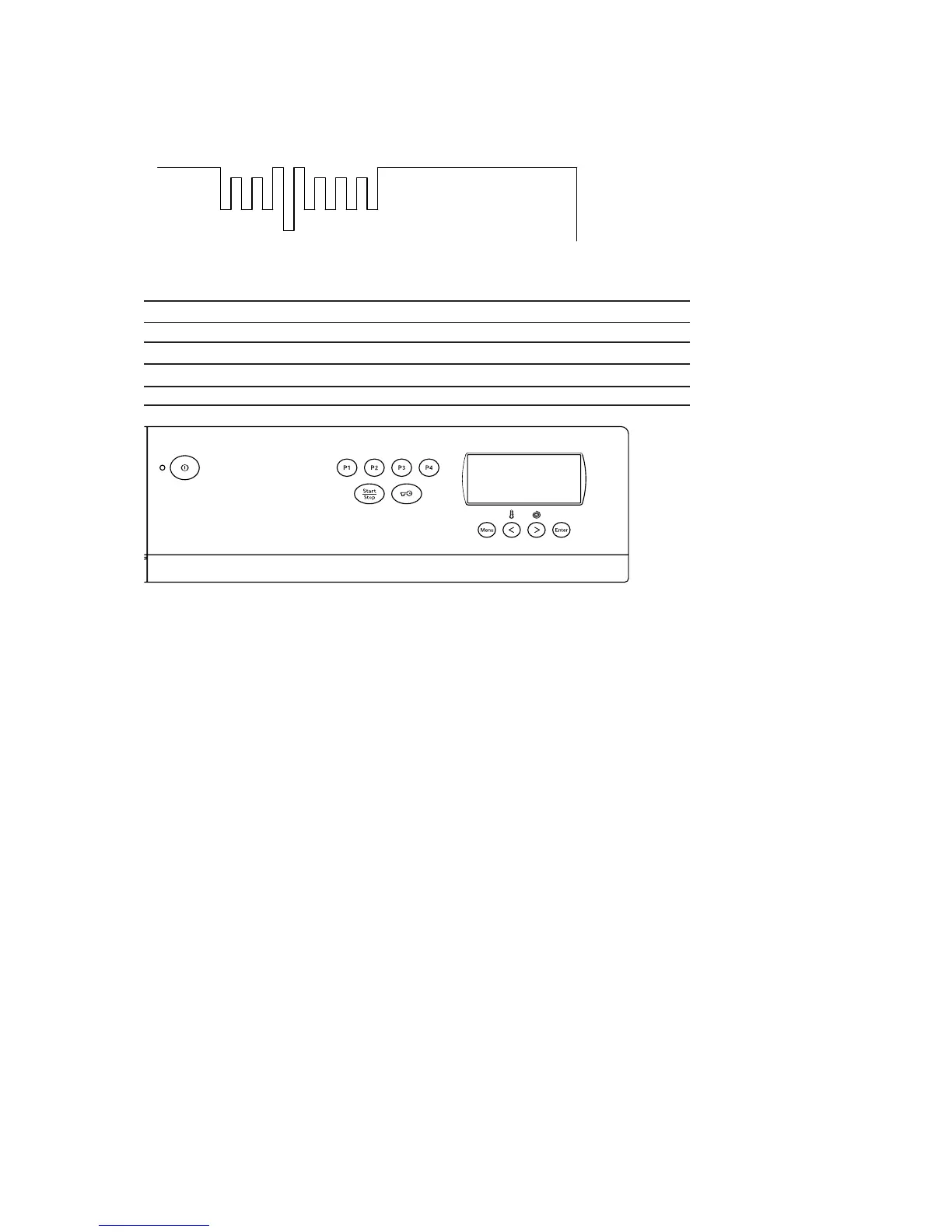
Loops on WM 66A control card
Reprogramming of display and button functions:
Programs must be in 0 position.
Change language.
5 x Enter + 5 x P1.
Change language with the arrow keys.
Change from Celsius to Fahrenheit.
5 x Enter + 5 x P2.
Change setting with the arrow keys < or >
Setting of child-safe Start and Menu.
5 x Enter + 5 x P3.
Change setting with the arrow keys < or >, 0 - 3 secs.
Setting of water intake.
5 x Enter + 5 x P4.
Change settings with the arrow keys and the Enter button, <=C = Cold, > Hot and Enter = E = Mixing.
Setting of spin speed.
5 x > + 5 x <.
Change settings with left arrow key < 1300, 1400, 1500 or 1600 rpm.
Reset program.
Hold down current program and press Enter
Reset WM66A sensor
5 x menu + key + start.
Loops and their function
J1 J2 J3 J4 J5
E 14
Loop Option Not broken/Closed Broken/Open
J1 Not used
J2 Not used
J3 Number of rinses 3 rinses 5 rinses
J4 Foam indication. OFF OFF
J5 Not used
Control unit Art. no. 8064265



 To Next Page