19
EN
General system requirements
General system requirements
eCLIQ
®
Connect consists of the eCLIQ
®
Connect key and the CLIQ
®
Connect
App.
eCLIQ
®
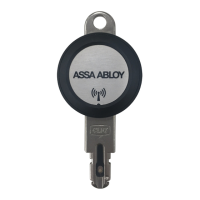
Connect key
The eCLIQ
®
Connect key’s wireless interface supports Bluetooth
®
4.0 or
later. Bluetooth Low Energy (BLE) operating mode is used. The range is 1
to 10 metres, depending on the mobile device (smartphone, iPhone,
iPad, etc.) and local conditions.
CLIQ
®
Connect app
The CLIQ
®
Connect app must be installed on a mobile device, such as a
smartphone. The mobile device requires internet access via WiFi
®
or mo-
bile radio telephone service.
Smartphones with Android™ Smartphones with Android™ 5.0 or later
are supported.
Download the CLIQ
®
Connect app from the
Google Play™ store.
iPhone
®
and iPad
®
iPhone
®
4s and iPad
®
3 or later with iOS
®
8.0 or later are supported.
Download the CLIQ
®
Connect app from the
App Store
®
.
We recommend updating the CLIQ
®
Connect app regularly.
CLIQ
®
Web Manager
The remote function in the CLIQ
®
Web Manager must be activated in order
to use the eCLIQ
®
Connect key.


 To Next Page
 Loading...