21
EN
Bluetooth interface
Bluetooth pairing
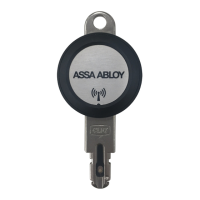
The mobile device, e.g. smartphone, and the eCLIQ
®
Connect key must be
paired with the eCLIQ
®
Connect app via Bluetooth
®
so that data can be
transmitted (follow the separate instructions for the app):
· mobile devices with Android™ only permit pairing with one key,
· mobile devices with iOS enable pairing with multiple keys.
The Bluetooth interface must be activated (“Activation”, page 23).
Unpairing Bluetooth
The unpairing of the mobile device and the eCLIQ
®
Connect key is carried
out with the software of the CLIQ
®
Connect App with activated key
(“Activation”, page23).
If pairing is not possible, the eCLIQ
®
Connect key must be deleted from the
device list in the mobile device.
Resetting the eCLIQ
®
Connect key
If the paired mobile device is no longer available, the eCLIQ
®
Connect key
must be reset before the key can be paired with another mobile device.
For this purpose, the battery must be removed for at least 30 seconds. Af-
ter the battery is inserted, the Bluetooth
®
interface is immediately ready
for use for 30 seconds.
Bluetooth interface


 To Next Page
 Loading...