Controls
4.7
Control Dial
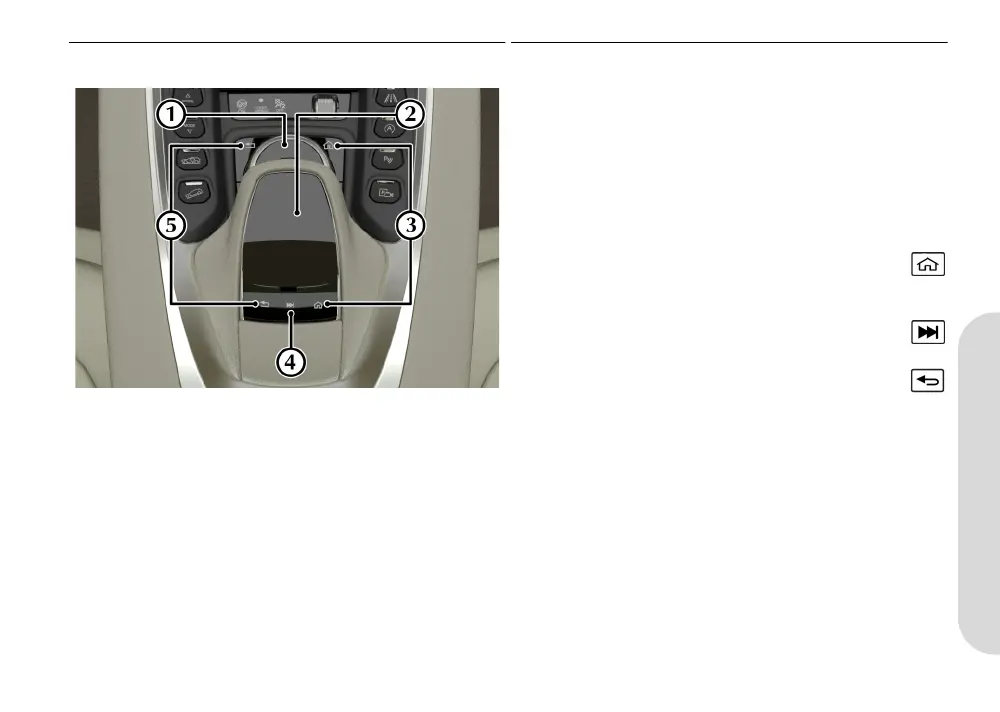
[1] CONTROL DIAL:
Use to navigate through menus in the infotainment system. Press
down to confirm a selection (referred to as ENTER throughout this
handbook).
[2] TOUCH PAD: (Optional)
Touch sensitive pad which can be used to navigate menus in the
infotainment system. Press down to confirm a selection (referred
to as ENTER throughout this manual). The touch pad can also be
used for handwriting recognition.
[3] HOME/FAVOURITE:
Press to open the main infotainment menu. Press and hold
to add the current menu item to the global favourites list.
[4] QUICK ACCESS MENU: (Touch Pad only)
Press to access the quick access menu.
[5] BACK:
Press to go back a level in the menu.
MY83-19A321-HA.book Page 7 Friday, July 24, 2020 12:35 PM


 To Next Page
 Loading...