How to Find Your Recordings
Delete Recording:
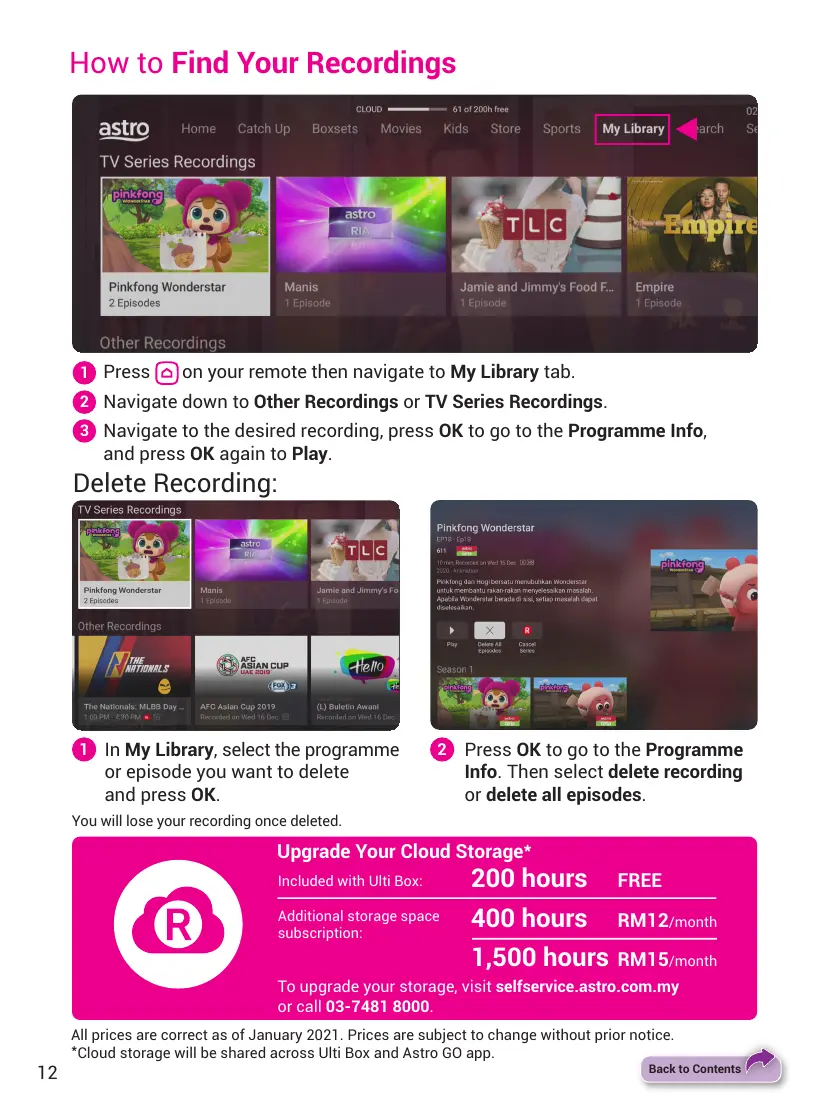
Press on your remote then navigate to My Library tab.
Navigate down to Other Recordings or TV Series Recordings.
Navigate to the desired recording, press OK to go to the Programme Info,
and press OK again to Play.
1
2
3
All prices are correct as of January 2021. Prices are subject to change without prior notice.
*
Cloud storage will be shared across Ulti Box and Astro GO app.
In My Library, select the programme
or episode you want to delete
and press OK.
You will lose your recording once deleted.
Press OK to go to the Programme
Info. Then select delete recording
or delete all episodes.
1 2
Upgrade Your Cloud Storage
*
200 hours FREE
Additional storage space
subscription:
Included with Ulti Box:
400 hours
1,500 hours
RM12/month
RM15/month
To upgrade your storage, visit selfservice.astro.com.my
or call 03-7481 8000.
12
Back to Contents


 To Next Page