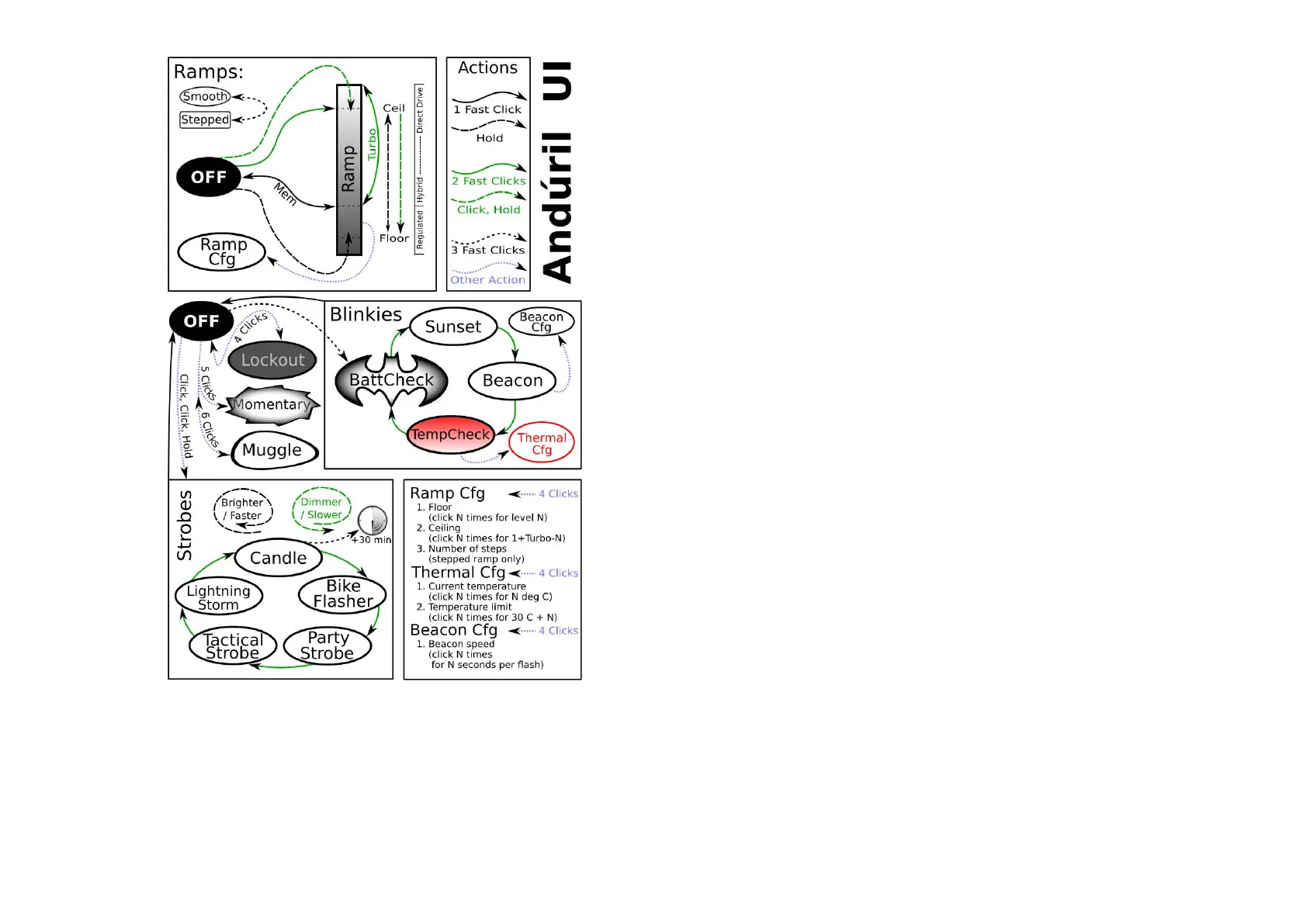
Not everything is covered in the diagram, please read the text.
Default UI: Smooth ramping
This UI provides smooth dimming of the light output
between FLOOR (lowest level) and CEILING (highest
level), with an easily accessible 100% TURBO mode.
Switch to STEPPED RAMP: If the lamp is ON:
(Hint: If you use 3 clicks from
OFF you engage battery check)
Turn the lamp ON: single-click the button, the EC03
turns ON using the previously
used light output level (MEM)
Ramp up; brighter: hold the button
Reverse ramp: while ramping in one direction,
release button briefly and hold
again
Ramp down; darker: Click, hold, when ON
(means: double-click, but hold
the second click a bit longer)
If you do this when the lamp is
OFF, it ramps down from the
CEILING (dashed double lines)
Instant top CEILING: from OFF: double-click
(double lines)
TURBO: from ON: double-click toggles
between turbo and the
memorized level
from OFF (You must first switch
ON): Click, then double-click
FLOOR / MOON mode: from OFF: Hold
turns on at the FLOOR level, it
makes a subtle “blink” to provide
a timing hint if you want to stay
there.
If you keep holding, it ramps up
Battery check: from OFF: triple-click (4 blinks, a
short pause, then 1 blink would
indicate 4.1 V)
Turn the EC03 OFF: single-click
UI: Stepped ramping
Using this UI the output does not ramp, it steps from
one mode to the next using hold. The firmware tries to
optimize these steps as equally-spaced on a cube-root
curve (considered an ideal mode-spacing by many).
In STEPPED RAMPING you can choose how many steps
you want. (See Ramp configuration for details).
All operations are the same as in smooth ramping
Switch to SMOOTH RAMP: when the lamp is ON:
Three clicks (Hint: If you use 3 clicks from OFF you engage
5 clicks from OFF to enter Momentary mode
To exit this mode, physically disconnect power
(unscrew the light).
This mode locks the flashlight into a single-mode
interface where the LEDs are only on when the button
is held down. It is intended for Morse code and other
signaling tasks.
Brightness is the last-ramped level, so adjust that
before entering momentary mode.
Muggle mode is for lending the EC03 to others. It has a
reduced output to make sure somebody won’t start a
fire. An extremely simple interface with a limited
brightness range — ~5 lm to ~240 lm, with slow
smooth ramping and no blinkies. Persists after a battery
change.
MUGGLE mode ON: from OFF 6 clicks to enter
MUGGLE mode OFF: 6 clicks to exit
One click ON / OFF and HOLD to ramp up / down.
4 clicks form OFF to disable the EC03, same to re-
enable the lamp.
Lockout makes the light safe to carry in a pocket or a
bag or anywhere else it might be pressed by accident.
Lockout doubles also as a momentary moonlight mode,
so the user can do quick tasks without having to unlock
the light. It uses the FLOOR of the current ramp.



 To Next Page
 Loading...