Rear features
Charging your ASUS Phone
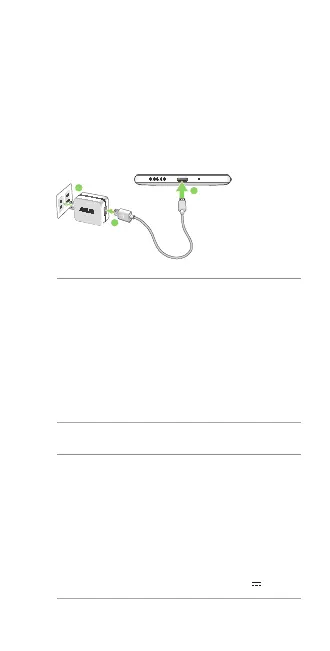
To charge your ASUS Phone:
1. ConnecttheUSBconnectorintothepower
adapter’s USB port.
2. ConnecttheotherendofthemicroUSBcableto
your ASUS Phone.
3. Plugthepoweradapterintoawallsocket.
NOTES:
• Forsafetypurposes,useONLY the bundled
poweradapterandcabletoavoiddamaging
yourdeviceandpreventtheriskofinjury.
• Forsafetypurposes,useONLY the bundled
poweradapterandcabletochargeyourASUS
Phone.
• Theinputvoltagerangebetweenthewalloutlet
andthisadapterisAC100V-240V.Theoutput
voltageofthemicroUSBcableis+5.2V 1A,5.2W.
IMPORTANT!
• WhenusingyourASUSPhonewhileitisplugged
toapoweroutlet,thegroundedpoweroutlet
must be near to the unit and easily accessible.
• WhenchargingyourASUSPhonethroughyour
computer, ensure that you plug the USB cable to
your computer’s USB 2.0 port.
• AvoidchargingyourASUSPhoneinan
environmentwithambienttemperatureofabove
35
o
C(95
o
F).
3
1
2
U12471_ZB501KL_UM_Folded_EU_V2.indb 5 2/15/2017 2:16:17 PM



 To Next Page