Notebook PC E-Manual
73
To update the BIOS:
1. Verify the Notebook PC’s exact model then download the latest
BIOS le for your model from the ASUS website.
2. Save a copy of the downloaded BIOS le to a ash disk drive.
3. Connect your ash disk drive to your Notebook PC.
4. Restart your Notebook PC then press during POST.
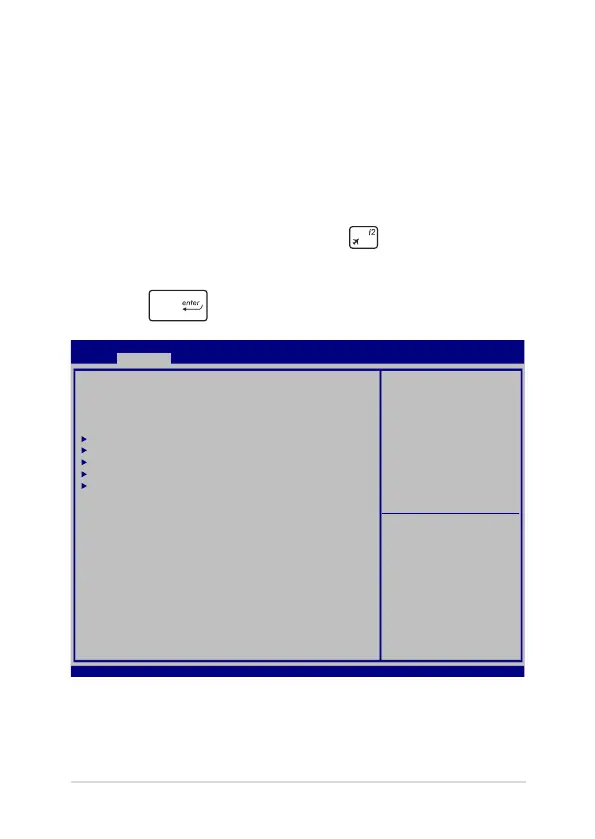
5. From the BIOS menu, select Advanced > Start Easy Flash, then
press .
Aptio Setup Utility - Copyright (C) 2015 American Megatrends, Inc.
Main Advanced Boot Security Save & Exit
Version 2.16.1243 Copyright (C) 2015 American Megatrends, Inc.
Start Easy Flash
Internal Pointing Device [Enabled]
Wake on Lid Open [Enabled]
Power Off Energy Saving [Enabled]
SATA Configuration
Graphics Configuration
Intel (R) Anti-Theft Technology Corporation
USB Configuration
Network Stack
Press Enter to run the
utility to select and
update BIOS.
→
← : Select Screen
↑↓ : Select Item
Enter: Select
+/— : Change Opt.
F1 : General Help
F9 : Optimized Defaults
F10 : Save & Exit
ESC : Exit



 To Next Page