Notebook PC E-Manual
85
Opdatering af BIOS.
1. Kontroller Notebook PC’ens nøjagtige modelnummer og hent
den seneste BIOS-l til denne model fra ASUS webstedet.
2. Gem en kopi af den hentede BIOS-l til et ashdrev.
3. Forbind ashdrevet til Notebook PC'en.
4. Genstart Notebook PC'en og tryk på under POST.
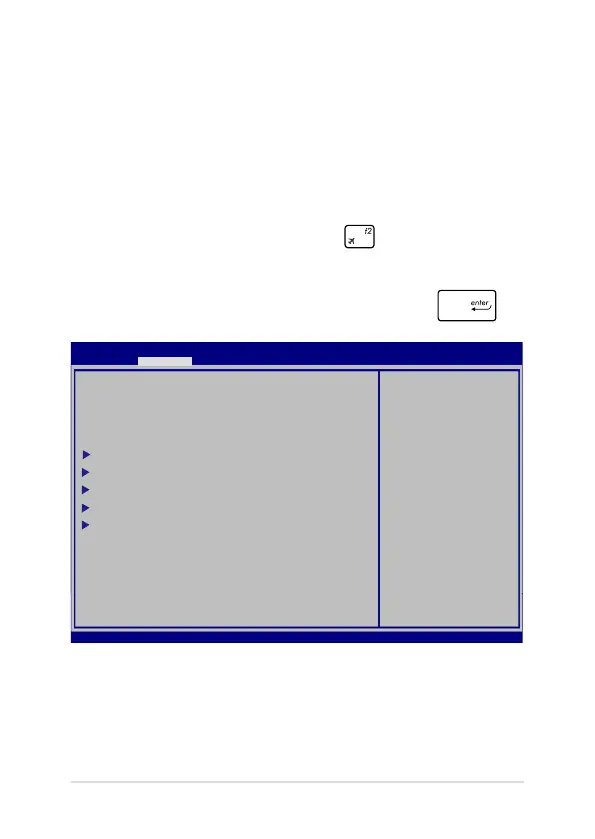
5. Under BIOS-opsætningsprogrammet, skal du klikke på Advanced
(avanceret) > Start Easy Flash, og tryk herefter på .
Aptio Setup Utility - Copyright (C) 2011 American Megatrends, Inc.
Start Easy Flash
Internal Pointing Device [Enabled]
Wake on Lid Open [Enabled]
Power Off Energy Saving [Enabled]
SATA Conguration
Graphics Conguration
Intel (R) Anti-Theft Technology Corporation
USB Conguration
Network Stack
Press Enter to run
the utility to
select and update
BIOS.
Aptio Setup Utility - Copyright (C) 2012 American Megatrends, Inc.
Main Advanced Boot Security Save & Exit
→←
: Select Screen
↑↓
: Select Item
Enter: Select
+/— : Change Opt.
F1 : General Help
F9 : Optimized Defaults
F10 : Save & Exit
ESC : Exit
Version 2.15.1226. Copyright (C) 2012 American Megatrends, Inc.



 To Next Page