LED projector E-Manual
67
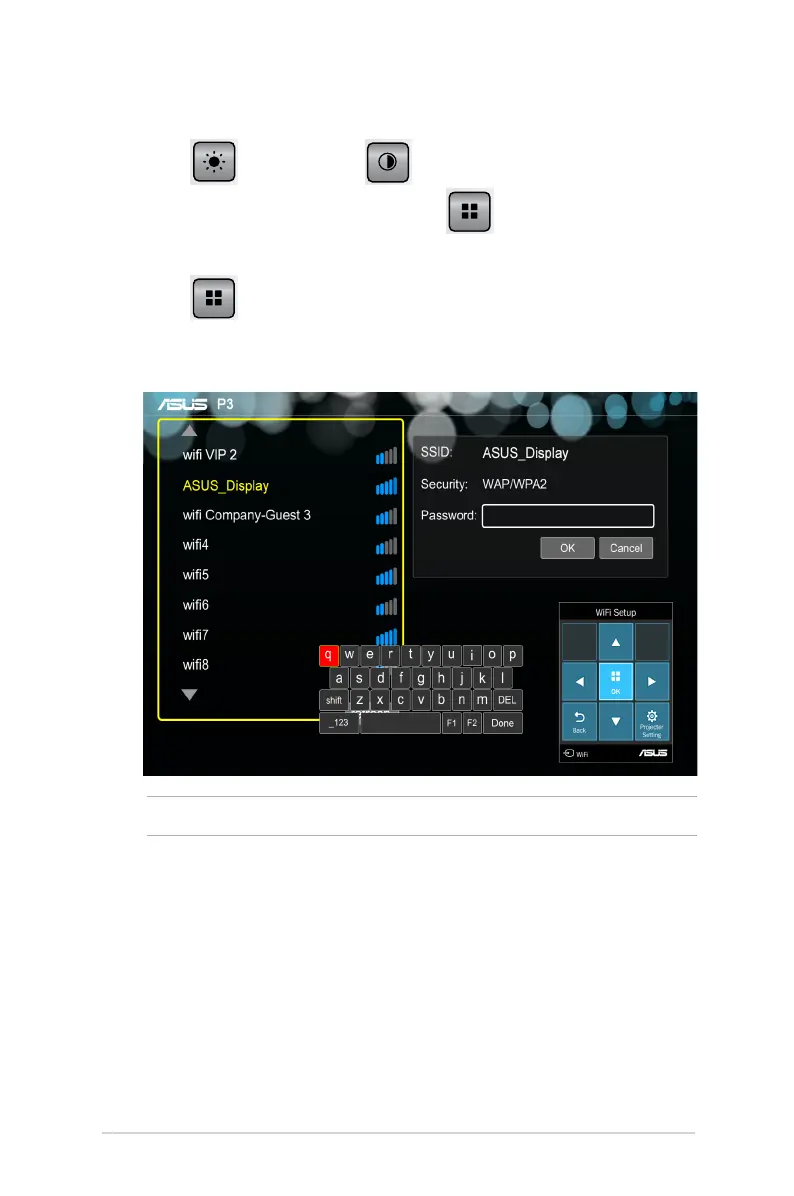
2. Select Network setting.
3. Press
to scroll up or to scroll down the list of
available Wi-Fi hotspots then press
to select the Wi-Fi
hotspot you would like to connect to.
4. Press
to launch the onscreen display menu’s keyboard.
Refer to the control panel grid when navigating the keyboard to
input the Wi-Fi hotspot’s password then press Enter.
NOTE: The P3B LED projector supports WPA/WPA2-enabled devices.
5. Press OK to start the Wi-Fi connection between the Wi-Fi
hotspot and your LED projector.
6. Repeat the same steps under Using ASUS WiFi Projection to
connect input devices to the LED projector.



 To Next Page