139
Aprindere
intermi-
tentă
Aprins
Aprindere
intermitentă
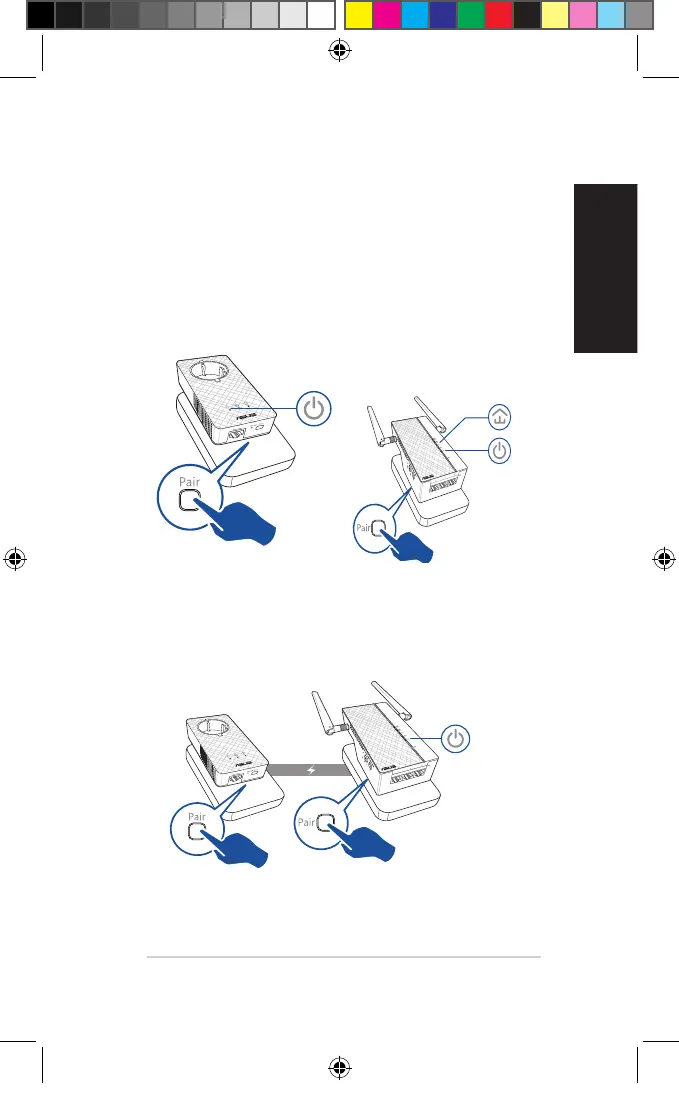
Împerechere de securitate
Crearea unei rețele Powerline sigure
1. Apăsați pe butonul Pair/
Reset (Împerechere/Re-
setare) de pe dispozitivul
PL-E56P.
2. Apăsați pe butonul Pair
(Împerechere) de pe dispo-
zitivul PL-AC56. Așteptați
până când LED-ul Powe-
line se aprinde, indicând
faptul că a fost creată o
rețea Powerline sigură.
Conectarea la o rețea Powerline sigură
1. Apăsați pe butonul Pair (Împerechere) de pe un dispozitiv
Powerline din rețeaua Powerline.
U11264_PL-AC56_Kit_QSG_Booklet_105x170mm.indb 139 2016-02-04 10:05:16



 To Next Page