1-16
Chapter 1: Product introduction
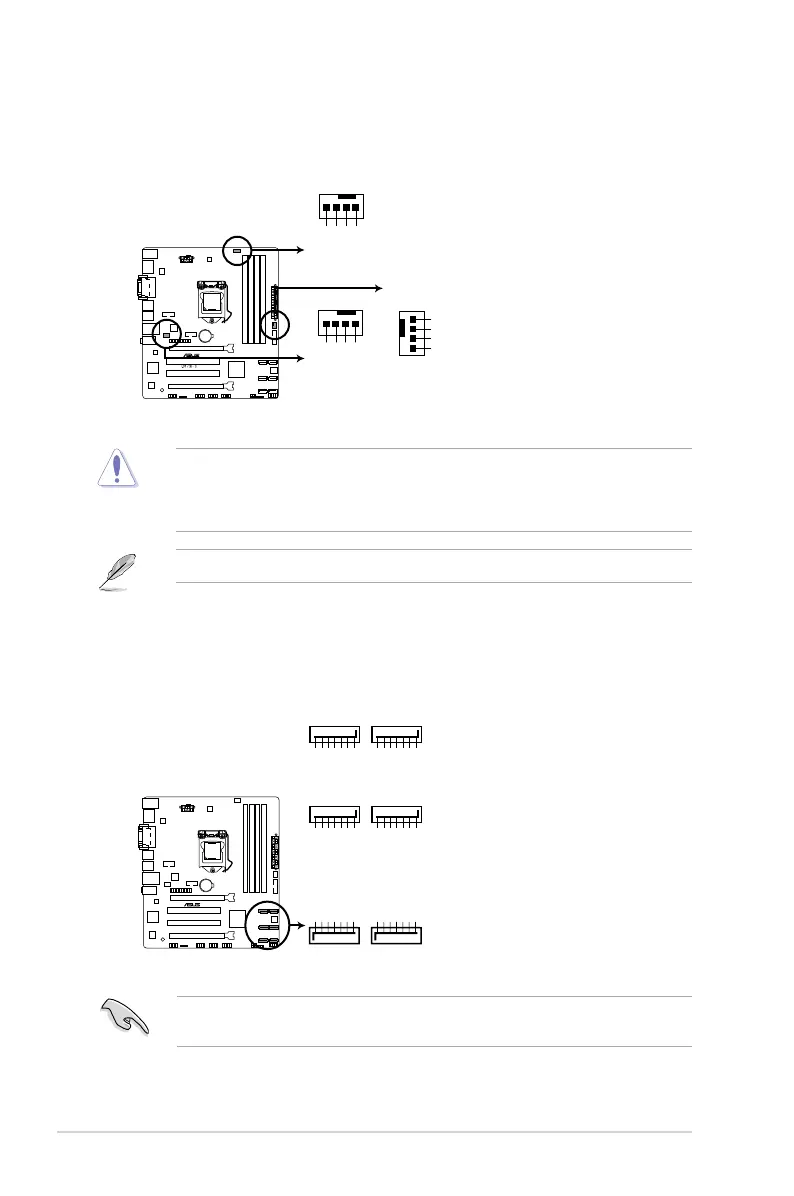
6. CPU and chassis fan connectors (4-pin CPU_FAN, 4-pin CHA_FAN1/2)
Connect the fan cables to the fan connectors on the motherboard, ensuring that the
black wire of each cable matches the ground pin of the connector.
Do not forget to connect the fan cables to the fan connectors. Insufcient air ow inside
the system may damage the motherboard components. These are not jumpers! Do not
place jumper caps on the fan connectors! The CPU_FAN connector supports a CPU fan of
maximum 1A (12 W) fan power.
Only the 4-pin CPU fan supports the ASUS Fan Xpert 2 feature.
7. Intel
®
Q87 Serial ATA 6.0Gb/s connector (7-pin SATA6G_1~6 [yellow])
This connector connects to Serial ATA 6.0 Gb/s hard disk drives via Serial ATA 6.0 Gb/s
signal cables.
When using hot-plug and NCQ, set the SATA Mode Selection item in the BIOS to [AHCI].
See section 2.6.4 SATA Conguration for details.



 To Next Page